CSI-RS Configuration for Beam Management
This notebook demonstrates how NeoRadium can be used to configure and visualize CSI-RS resources for 5G NR beam-management procedures.
The example uses a multi-antenna CDL channel and the CsiRsConfig.beamformingConfig utility to create a set of CSI-RS resources representative of a practical beamforming workflow. These resources are organized into multiple CSI-RS resource sets that support different stages of beam management:
Periodic beam sweeping, used to identify candidate transmission beams.
Aperiodic beam probing, used to refine beam selection around the best sweeping beam.
Semi-persistent CSI feedback measurements, used for PMI, RI, and CQI reporting.
The notebook first creates and examines the CSI-RS configuration generated by beamformingConfig. It then visualizes how the different CSI-RS resource sets are scheduled over time, illustrating the interaction between periodic, aperiodic, and semi-persistent CSI-RS transmissions.
By following the examples and animations, you can see how CSI-RS resources are distributed across slots and how NeoRadium models CSI-RS signaling for beam sweeping, beam refinement, and CSI feedback in a beam-management scenario.
[1]:
import numpy as np
import scipy.io
import matplotlib.animation as animation
import matplotlib.pyplot as plt
from IPython.display import HTML, Markdown, display

from neoradium import BandwidthPart, CsiRsConfig, CdlChannel, AntennaPanel
[2]:
# Create a 'BandwidthPart' and a CDL-C channel object:
bwp = BandwidthPart(numRbs=52, spacing=15)

channel = CdlChannel(bwp, profile='C', delaySpread=30, carrierFreq=4e9, dopplerShift=5,
                     txAntenna=AntennaPanel([1,4], polarization='x', beamWidth=[65,65]),
                     rxAntenna=AntennaPanel([1,2], polarization='x', beamWidth=[65,360]),
                     rxOrientation = [180,0,0])
print(channel)
CDL-C Channel Properties:
  carrierFreq:              4 GHz
  normalizeGains:           True
  normalizeOutput:          True
  txDir:                    Downlink
  filterLen:                16 samples
  delayQuantSize:           64
  stopBandAtten:            80 dB
  dopplerShift:             5 Hz
  coherenceTime:            84.628 milliseconds
  delaySpread:              30 ns
  ueDirAZ:                  0°, 90°
  xPolPower:                7.00 dB
  angleSpreads:             2° 15° 3° 7°
  TX Antenna:
    Total Elements:         8
    spacing:                0.5𝜆, 0.5𝜆
    shape:                  1 rows x 4 columns
    polarization:           x
  RX Antenna:
    Total Elements:         4
    spacing:                0.5𝜆, 0.5𝜆
    shape:                  1 rows x 2 columns
    polarization:           x
    Orientation (𝛼,𝛃,𝛄):     180° 0° 0°
  hasLOS:                   False
  NLOS Paths (24):
    Delays (ns):            0.000 6.297 6.657 6.987 6.528 19.09 19.34 19.68 19.75 23.80 24.63 28.00
                            36.85 39.24 65.11 81.31 127.7 138.0 164.7 168.2 189.1 199.1 211.2 259.5
    Powers (dB):            -4.40 -1.20 -3.50 -5.20 -2.50 0.000 -2.20 -3.90 -7.40 -7.10 -10.7 -11.1
                            -5.10 -6.80 -8.70 -13.2 -13.9 -13.9 -15.8 -17.1 -16.0 -15.7 -21.6 -22.8
    AODs (Deg):             -47  -23  -23  -23  -41  0    0    0    73   -64  80   -97
                            -55  -64  -78  103  99   89   -102 92   93   107  120  -124
    AOAs (Deg):             -101 120  120  120  -128 170  170  170  55   66   -48  47
                            68   -69  82   31   -16  4    -14  10   6    1    -22  34
    ZODs (Deg):             97   99   99   99   101  99   99   99   105  95   106  94
                            104  104  93   104  95   93   92   107  93   93   105  108
    ZOAs (Deg):             88   72   72   72   70   75   75   75   67   64   71   60
                            91   60   61   101  62   67   53   62   52   62   58   57
Using beamformingConfig
The utility class method beamformingConfig creates a CsiRsConfig object suitable for typical FR1 beamforming experiments. It creates three CSI-RS resource sets:
A periodic sweeping set of 1-port resources used to obtain a coarse CRI.
An aperiodic probing set of 1-port resources used to refine the CRI around the best sweep beam.
A semi-persistent multi-port set used to measure PMI, RI, and CQI.
Sweeping and probing CSI-RS are transmitted on OFDM symbol 4, while the PMI CSI-RS is sent on OFDM symbol 6. Up to four 1-port CSI-RS resources are packed into a slot.
Notes:
This method uses a simple static beam sweeping/probing approach. In practice, adaptive beam sweeping can be used by incorporating the previously selected probing beam into the subsequent sweeping set and centering future sweeps around it. This approach resembles a wider beam probing around the current best beam, including a few wider beams to detect beam drift and prevent getting stuck in a local maximum.
The beamformingReports class method may be used to create a
CsiReportManobject containing CSI report information corresponding to the CSI-RS resources created bybeamformingConfig.
For more details, refer to the documentation of beamformingConfig.
[3]:
csiRsConfig = CsiRsConfig.beamformingConfig(bwp, channel.txAntenna.numPorts, sweepsPerSlot=4)
print(csiRsConfig)
CSI-RS Configuration: (3 Resource Sets)
  CSI-RS Resource Set 1:(8 NZP resources)
    Resource Set ID:      1
    Resource Type:        periodic
    Resource Blocks:      52 RBs starting at 0
    Slot Period:          20
    Num CSI-RS:           8
    CSI-RS 1:
      resourceId:         1
      numPorts:           1
      cdmSize:            1 (noCDM)
      density:            1
      RE Indices:         2
      Symbol Indices:     4
      Table Row:          2
      Slot Offset:        0
      Power:              0 dB
      scramblingID:       0
    CSI-RS 2:
      resourceId:         2
      numPorts:           1
      cdmSize:            1 (noCDM)
      density:            1
      RE Indices:         3
      Symbol Indices:     4
      Table Row:          2
      Slot Offset:        0
      Power:              0 dB
      scramblingID:       0
    CSI-RS 3:
      resourceId:         3
      numPorts:           1
      cdmSize:            1 (noCDM)
      density:            1
      RE Indices:         4
      Symbol Indices:     4
      Table Row:          2
      Slot Offset:        0
      Power:              0 dB
      scramblingID:       0
    CSI-RS 4:
      resourceId:         4
      numPorts:           1
      cdmSize:            1 (noCDM)
      density:            1
      RE Indices:         5
      Symbol Indices:     4
      Table Row:          2
      Slot Offset:        0
      Power:              0 dB
      scramblingID:       0
    CSI-RS 5:
      resourceId:         5
      numPorts:           1
      cdmSize:            1 (noCDM)
      density:            1
      RE Indices:         2
      Symbol Indices:     4
      Table Row:          2
      Slot Offset:        1
      Power:              0 dB
      scramblingID:       0
    CSI-RS 6:
      resourceId:         6
      numPorts:           1
      cdmSize:            1 (noCDM)
      density:            1
      RE Indices:         3
      Symbol Indices:     4
      Table Row:          2
      Slot Offset:        1
      Power:              0 dB
      scramblingID:       0
    CSI-RS 7:
      resourceId:         7
      numPorts:           1
      cdmSize:            1 (noCDM)
      density:            1
      RE Indices:         4
      Symbol Indices:     4
      Table Row:          2
      Slot Offset:        1
      Power:              0 dB
      scramblingID:       0
    CSI-RS 8:
      resourceId:         8
      numPorts:           1
      cdmSize:            1 (noCDM)
      density:            1
      RE Indices:         5
      Symbol Indices:     4
      Table Row:          2
      Slot Offset:        1
      Power:              0 dB
      scramblingID:       0
  CSI-RS Resource Set 2:(4 NZP resources)
    Resource Set ID:      2
    Resource Type:        aperiodic
    Resource Blocks:      52 RBs starting at 0
    active:               False
    Num CSI-RS:           4
    CSI-RS 9:
      resourceId:         9
      numPorts:           1
      cdmSize:            1 (noCDM)
      density:            1
      RE Indices:         2
      Symbol Indices:     4
      Table Row:          2
      Power:              0 dB
      scramblingID:       0
    CSI-RS 10:
      resourceId:         10
      numPorts:           1
      cdmSize:            1 (noCDM)
      density:            1
      RE Indices:         3
      Symbol Indices:     4
      Table Row:          2
      Power:              0 dB
      scramblingID:       0
    CSI-RS 11:
      resourceId:         11
      numPorts:           1
      cdmSize:            1 (noCDM)
      density:            1
      RE Indices:         4
      Symbol Indices:     4
      Table Row:          2
      Power:              0 dB
      scramblingID:       0
    CSI-RS 12:
      resourceId:         12
      numPorts:           1
      cdmSize:            1 (noCDM)
      density:            1
      RE Indices:         5
      Symbol Indices:     4
      Table Row:          2
      Power:              0 dB
      scramblingID:       0
  CSI-RS Resource Set 3:(1 NZP resources)
    Resource Set ID:      3
    Resource Type:        semiPersistent
    Resource Blocks:      52 RBs starting at 0
    Slot Period:          10
    active:               False
    Num CSI-RS:           1
    CSI-RS 13:
      resourceId:         13
      numPorts:           8
      cdmSize:            2 (fd-CDM2)
      density:            1
      RE Indices:         6  8
      Symbol Indices:     5
      Table Row:          7
      Slot Offset:        0
      Power:              0 dB
      scramblingID:       0
Timing Aspects of CSI-RS Resources
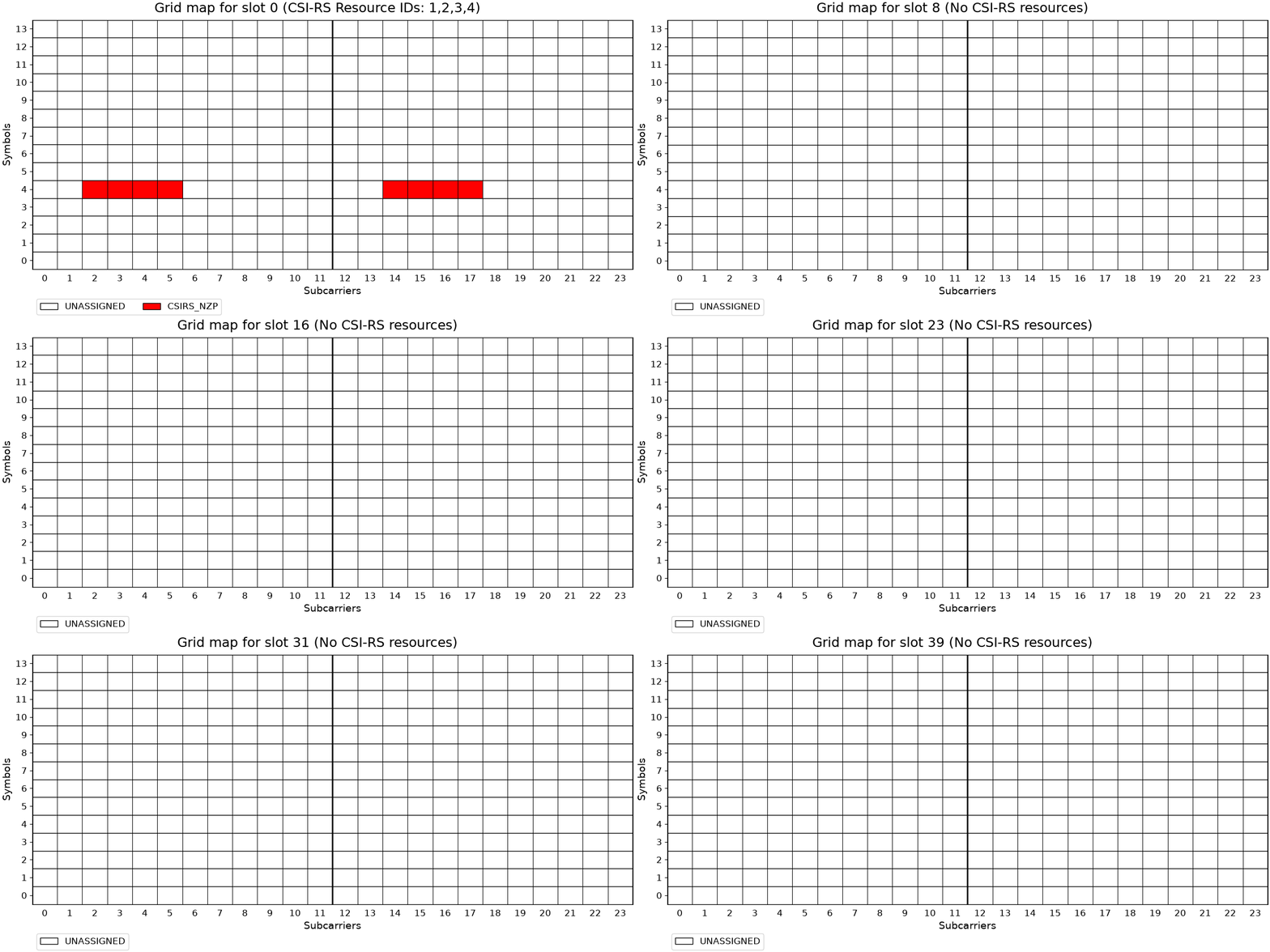
The following code illustrates CSI-RS resources on a grid map for the first 40 slots of communication. As the animation runs, observe the following:
CSI-RS for sweeping beams is transmitted every 20 slots. The first four beams are sent at slots 0 and 20, while the next four beams are transmitted on slots 1 and 21.
CSI-RS for beam probing is aperiodic. In the following code, they are triggered on slots
[5, 15, 27, 32](hard-coded for this example).The CSI-RS resource set for CSI feedback (e.g., PMI, RI, CQI) is semi-persistent. It is activated at slot 18. With a period of 10, it appears on slots 20 and 30.
[4]:
csiRsConfig[2].active=False
txGrid = bwp.createGrid(csiRsConfig.numPorts)
csiRsConfig.populateGrid(txGrid)
stats = txGrid.getStats()
rsIdStrs = [ key.split("(")[1][:-1] for key,val in stats.items() if "CSIRS_NZP" in key ]
axes = txGrid.drawMap(rbRange=(0,1),
title=f"Grid map for slot {0} with CSI-RS Resource IDs: {",".join(rsIdStrs)}")
# Callback function to update the grid map
def updateMap(frame):
axes[0].clear()
bwp.slotNo = frame
if bwp.slotNo in [5, 15, 27, 32]: csiRsConfig[1].trigger()
if bwp.slotNo == 18: csiRsConfig[2].active=True
txGrid = bwp.createGrid(csiRsConfig.numPorts)
csiRsConfig.populateGrid(txGrid)
stats = txGrid.getStats()
rsIdStrs = [ key.split("(")[1][:-1] for key,val in stats.items() if "CSIRS_NZP" in key ]
title = f"Grid map for slot {frame} ({'No CSI-RS resources' if len(rsIdStrs)==0 else ('CSI-RS Resource IDs: '+",".join(rsIdStrs))})"
txGrid.drawMap(rbRange=(0,1), title=title, axes=axes)
return ()
# Create the animation
fig = axes[0].get_figure()
anim = animation.FuncAnimation(fig, updateMap, frames=40, interval=1000, blit=False, repeat=True)
plt.close(fig) # Prevent duplicate static plots
anim.save("CsiRsBeams.gif", writer=animation.PillowWriter(1)) # Show one frames per second
display(Markdown(""))
# Another option is to use the following command which gives you more controls for running
# the animation.
# HTML(anim.to_jshtml())
[ ]:
[ ]: