DeepMIMO and UE Trajectories
This module introduces the DeepMimoData class, which encapsulates data related to
various scenarios in the DeepMIMO framework. The
getRandomTrajectory() method within this class facilitates the generation of
a random trajectory within the specified DeepMIMO scenario. Additionally, the
interactiveTrajPoints() method enables you to define your own trajectory on
an interactive map. A complete example of using the DeepMimoData class is available at
Working with DeepMIMO Scenarios in the playground.
- class neoradium.deepmimo.NrAxes(ax, dmData)
Thin wrapper around a matplotlib Axes that adds incremental-drawing helpers used during animation. Instances of this class are passed to the drawing callback of
DeepMimoData.animateTrajectory()in place of the rawmatplotlib.axes.Axesobject so the callback can:append new samples to an existing
plot()line without re-plotting (addNewPoint()),append new samples to an existing
fill_between()shaded region (addNewRange()),swap the data of an existing
imshow()image (updateImage()),draw or update a beam-direction arrow anchored at the base-station position (
drawBeamArrow(),updateBeamArrow()).
Every unrecognized attribute access falls through to the underlying
Axesobject via__getattr__, so aNrAxesbehaves like a regularAxesfor the rest of the matplotlib API (set_title,set_xlim,legend, etc.).- Parameters:
ax (matplotlib.axes.Axes) – The matplotlib axes being wrapped.
dmData (
DeepMimoData) – TheDeepMimoDataobject whose scenario metadata (base-station position, x/y bounds) is used bydrawBsPanel(),drawBeamArrow(), andupdateBeamArrow().
- addNewPoint(newX, newY, lineIdx=0)
Append a new
(x, y)sample to an existing line on this axes. Used to grow a line incrementally during an animation without re-plotting the entire history each frame.- Parameters:
newX (float or array-like) – X-coordinate(s) of the new sample(s) to append.
newY (float or array-like) – Y-coordinate(s) of the new sample(s) to append.
lineIdx (int, default=0) – Index of the line inside
ax.lines(in the order they were created). Use this when more than oneplot()call has been made on the same axes.
- Returns:
The updated line object. Return it from the animation callback so
blit=Truematplotlib animations re-render it correctly.- Return type:
- addNewRange(newX, newMinY, newMaxY, polyIdx=0)
Append a new
(x, minY, maxY)sample to an existingfill_between()shaded region so the region can grow incrementally during an animation.The polygon’s raw
x/minY/maxYsample arrays are cached as attributes (_xdata,_miny,_maxy) on the underlyingPolyCollection, and the polygon’s closed 2-D boundary is reconstructed on every call (upper edge forward, then lower edge backward).- Parameters:
newX (float or array-like) – X-coordinate(s) of the new sample(s).
newMinY (float or array-like) – Lower-edge Y-coordinate(s) at
newX.newMaxY (float or array-like) – Upper-edge Y-coordinate(s) at
newX.polyIdx (int, default=0) – Index of the fill region in
ax.collections(in the order they were created).
- Returns:
The updated fill-between polygon collection. Return it from the animation callback so it re-renders correctly under
blit=True.- Return type:
- updateImage(newImage, imageIdx=0)
Replace the pixel data of an existing
imshow()image without re-creating the image, which preserves the colorbar, extent, and colormap so no flicker occurs during animation.- Parameters:
newImage (NumPy array) – New pixel data with the same shape and dtype as the original
imshow()array.imageIdx (int, default=0) – Index of the image inside
ax.images(in the order they were created).
- Returns:
The updated image artist. Return it from the animation callback so
blit=Truere-renders it.- Return type:
- drawBsPanel(txBearingAngle, length=None)
Draw the base-station panel indicator on this axes. This is a thin passthrough to
DeepMimoData.drawBsPanel()on the associatedDeepMimoDataobject.- Parameters:
txBearingAngle (float) – Bearing angle of the base-station panel in degrees, in the scenario’s global coordinate system.
length (float or None, default=None) – Length of the panel marker in meters. When omitted, a sensible default based on the scenario extent is used.
- Returns:
The patch representing the base-station panel.
- Return type:
- drawBeamArrow(globalPhi, color='orange', length=None)
Draw a beam-direction arrow anchored at the base-station position, pointing at azimuth
globalPhi(in the scenario’s global coordinate system). The arrow length and color are cached on thisNrAxesfor later use byupdateBeamArrow().The returned patch is flagged as animated (
set_animated(True)) soblit=Trueanimations can cheaply repaint it every frame.- Parameters:
globalPhi (float) – Azimuth angle of the beam in degrees. Values greater than 180 are wrapped by subtracting 360.
color (str, default='orange') – Any matplotlib-recognized color specification.
length (float or None, default=None) – Length of the arrow in meters. When omitted, defaults to one quarter of the scenario extent.
- Returns:
The arrow patch. Return it from the animation callback so
blit=Truere-renders it.- Return type:
- updateBeamArrow(globalPhi, patchIdx=-1)
Update an existing beam arrow (previously created with
drawBeamArrow()) to point at a new azimuth. Reuses the color and length set on the initial call.- Parameters:
globalPhi (float) – New azimuth angle in degrees. Values greater than 180 are wrapped by subtracting 360.
patchIdx (int, default=-1) – Index of the arrow inside
ax.patches. The default-1targets the most-recently-added patch.
- Returns:
The updated arrow patch.
- Return type:
- class neoradium.deepmimo.DeepMimoData(scenario, baseStationId=1, gridId=0)
This class encapsulates all the ray-tracing data read from DeepMIMO scenario files. It can be used to create random user (UE) trajectories by interpolating the ray-tracing information at intermediate points on the trajectory.
The generated trajectories can then be used by the
TrjChannelclass to generate temporally and spatially consistent sequences of MIMO channels.- Parameters:
scenario (str) –
The name of the DeepMIMO scenario, which is also the name of the folder containing the scenario files.
baseStationId (int or str) –
The base station identifier. In the newer (V4) versions of DeepMIMO scenario files, the base station identifier is a string; in older (V1/V3) versions it is an integer. You can use the
showScenarioInfo()class method to print information about available base stations and correspondingbaseStationIdvalues. The default value is 1. In case of string base station identifiers, this default value results in selecting the first base station (after sorting the base station identifiers). Passing a string identifier against a V1 or V3 scenario raises aValueError.gridId (int or str) –
For the scenarios with multiple user grids, this parameter determines which user grid data should be loaded. The default value is 0 which results in loading the first user grid. In the newer (V4) versions of DeepMIMO scenario files, the grid identifier is a string; in older (V1/V3) versions it is an integer. You can use the
showScenarioInfo()class method to print information about available user grids and their corresponding identifiers. In case of string grid identifiers, the default value of zero results in selecting the first user grid (after sorting the user grid identifiers). Passing a string identifier against a V1 or V3 scenario raises aValueError.
Other Properties:
After reading the DeepMIMO scenario files, this class sets internal properties as follows:
- gridSize:
A NumPy array of 2 integers indicating the number of grid points in
xandydirections.- numGridPoints:
The total number of grid points with ray-tracing data in the specified scenario. Note that \(numGridPoints = gridSize[0] * gridSize[1]\).
- delta:
The distance between two neighboring grid points (in
xorydirection). It is assumed that this value is the same along theXandYaxes.- bsXyz:
A NumPy array containing the three-dimensional coordinates of the base station.
- xyMin, xyMax:
NumPy arrays containing the coordinates of lower-left and upper-right points on the grid. In other words, for the \((x,y)\) coordinates of any grid point, we have:
\[ \begin{align}\begin{aligned}xyMin[0] \le x \le xyMax[0]\\xyMin[1] \le y \le xyMax[1]\end{aligned}\end{align} \]- carrierFreq:
The carrier frequency for the specified scenario.
- minPaths, avgPaths, maxPaths:
Measured statistics representing the minimum, average, and maximum number of paths between the UE and the base station for all grid points in the specified scenario.
- numTotalBlockage:
Total number of grid points with no paths between the UE and the base station.
- numLOS:
Total number of grid points where there is a line-of-sight (LOS) path between the UE and the base station.
Indexing:
This class supports direct indexing to the
TrjPointobjects in the DeepMIMO dataset. For example:deepMimoData = DeepMimoData("O1_3p5B", baseStationId=3) # Read and create dataset tenFirstPoints = deepMimoData[:10] # Get the first 10 points in the dataset
The returned
TrjPointobjects are live references to the internal store rather than copies; mutating a returned point will mutate the corresponding entry in this dataset.Iterating through points:
This class has a generator function (
__iter__) which makes it easier to use it in a loop. For example, the following code counts the number of points with LOS paths.deepMimoData = DeepMimoData("O1_3p5B", baseStationId=3) # Read and create dataset numLosPoints = 0 for point in deepMimoData: # Use "deepMimoData" directly with the "for" loop if point.hasLos==1: numLosPoints += 1
- classmethod showScenarioInfo(scenario)
This class method prints information about the specified DeepMIMO scenario. It can be used to find out the base stations and user grids available in the scenario.
- Parameters:
scenario (str) – The name of the DeepMIMO scenario, which is also the name of the folder containing the scenario files.
- print(indent=0, title='DeepMimoData Properties:', getStr=False)
Prints the properties of this class.
- Parameters:
indent (int) – Used internally to adjust the indentation of the printed info.
title (str) – The title used for the information. By default the text “DeepMimoData Properties:” is used.
getStr (bool) – If this is True, the function returns a string instead of printing the information. Otherwise, when this is False (the default), the function prints the information.
- Returns:
If
getStris True, this function returns a string containing information about the properties of this class. Otherwise, nothing is returned (default).- Return type:
str or None
- classmethod setScenariosPath(newPath)
This class method establishes the path to a folder that contains the ray-tracing scenarios. Within this folder, each scenario is organized into its own sub-folder, with the same name as the scenario itself.
- Parameters:
newPath (str) – The new path to the ray-tracing scenario files.
- getRandomTrajectory(xyBounds, segLen, bwp, trajLen=None, trajTime=None, trajDist=None, xyStart=None, prob=None, trajDir='All', speedMps=None, seed=None)
Creates and returns a random trajectory in the area specified by
xyBoundsinside the grid of points in the given scenario. This function first creates a random “On-Grid” trajectory of points. It then interpolates additional trajectory points between the grid points. See Working with DeepMIMO Scenarios for a complete example.- Parameters:
xyBounds (2-D list of integers) – A 2x2 matrix representing the bounds of the area where the random trajectory will be generated. The matrix should be in the format
[[minX, minY], [maxX, maxY]]. All points in the returned trajectory will be confined within these bounds. If the area defined byxyBoundsoverlaps with parts outside the grid area specified byxyMinandxyMax, the boundaries are internally adjusted to ensure that the trajectory falls within the intersection of the areas defined byxyBoundsand the pair (xyMin,xyMax).segLen (integer) – The number of grid points that the shortest segment of the trajectory traverses, excluding the starting point. For instance, if
segLenis set to 2, it implies that each segment of the generated trajectory passes through at least three grid points (including the starting point). This parameter can be utilized to control the frequency of turns in a trajectory. A largersegLenvalue results in a reduced number of turns in the trajectory.bwp (The bandwidth part used to decide the timing of the interpolated trajectory points. One interpolated) – trajectory point is created for each slot of communication.
trajTime (float or None) – If provided, it represents the total travel time (in seconds) along the trajectory. Note that the actual travel time on the generated trajectory may not be precisely equal to this value due to the approximations in the calculations.
trajDist (float or None) – If provided, it represents the total travel distance (in meters) along the trajectory. This parameter is ignored if
trajTimeis specified. Note that the actual travel distance on the generated trajectory may not be precisely equal to this value due to the approximations in the calculations.trajLen (integer or None) –
If provided, it represents the total number of grid points on the trajectory (excluding the starting point). This parameter is ignored if one of
trajTimeortrajDistis specified.Important
At least one of
trajTime,trajDist, ortrajLenmust be specified.xyStart (list, tuple, NumPy array, or None) – The 2-D coordinates of the trajectory’s initial position. If this parameter is set to None (default), the trajectory’s starting point is automatically determined based on
trajDirandxyBounds. Otherwise, the given value is first checked against the trajectory bounds (xyBounds) and modified if needed to ensure that the starting point falls within the specified boundaries.prob (tuple or None) – If provided, it must be a tuple containing three probability values for turning right, going straight, and turning left. These three probability values must sum to 1. If not specified, all three probabilities are assumed to be equal: \(P_{right}=P_{straight}=P_{left}=\frac 1 3\)
trajDir (str) –
This value can be used to restrict the direction of movement along the trajectory. At each step, the moving direction is the angle between the velocity vector and the X-axis. There are eight possible directions, corresponding to angles: 0, 45, 90, 135, 180, 225, 270, and 315 degrees. This parameter provides a general direction for the trajectory. It can take one of the following values:
- All:
No restriction in direction of movement in the trajectory. This is the default value.
- +X:
This forces the trajectory to move along the X-axis in positive direction. The only movement directions allowed in the trajectory are 45, 0, and 315 degrees.
- -X:
This forces the trajectory to move along the X-axis in negative direction. The only movement directions allowed in the trajectory are 135, 180, and 225 degrees.
- +Y:
This forces the trajectory to move along the Y-axis in positive direction. The only movement directions allowed in the trajectory are 135, 90, and 45 degrees.
- -Y:
This forces the trajectory to move along the Y-axis in negative direction. The only movement directions allowed in the trajectory are 225, 270, and 315 degrees.
speedMps (float or None) – If provided, it specifies the trajectory speed in meters per second. If not provided, the speed is automatically determined based on the scenario type (indoor vs. outdoor). The current implementation uses an average walking speed of 1.2 m/s for indoor scenarios and 14 m/s for outdoor scenarios (which corresponds to a car moving at 31.32 miles per hour). Note that the actual linear speed on the trajectory may not be precisely equal to this value due to the approximations in the calculations.
seed (int) – The seed used by this function to create random values. Setting this to a fixed value ensures the reproducibility of the generated trajectory. The default value is None, indicating that this channel model uses the NeoRadium’s global random number generator.
- Returns:
A
Trajectoryobject containing all the information about the created trajectory- Return type:
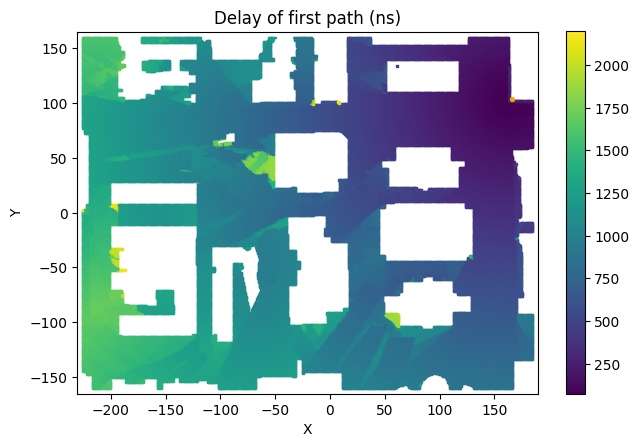
- drawMap(mapType='LOS-NLOS', overlay=None, figSize=6, ax=None)
This visualization function creates a map of the scenario, assigning different colors to points on the grid.
- Parameters:
mapType (str) –
This specifies the type of map to be drawn by this function:
- LOS-NLOS:
The color used for each point depends on whether it has a line-of-sight path or if there is total blockage at that point.
- 1stPathDelays:
The color used for each point depends on the amount of delay for the strongest path at that point.
- 1stPathPowers:
The color used for each point depends on the path power of the strongest path at that point.
overlay (
Trajectoryor NumPy array or None) – If this is aTrajectoryobject, then the trajectory will be drawn over the map. If this is a NumPy array, it must contain a list of point indices in the current scenario. In this case all the points in the list will be drawn (scatter plot) over the map.figSize (float) – This value determines the approximate size of the drawn map. If the maximum of the map’s width and height are less than the specified value, the map is scaled to match the specified size. The default value is set to
6.ax – If specified, it must be a matplotlib
Axesobject on which the scenario map is drawn. This can be used if you want to have a group of matplotlib subplots and draw the map in one of them.
- Returns:
The matplotlib
Axesobject used to draw the Scenario Map.- Return type:
Example:
deepMimoData = DeepMimoData("asu_campus1", baseStationId=1, gridId=0)
deepMimoData.drawMap("1stPathDelays")
- drawBsPanel(ax, bearingAngle, length=None)
Draw the base station antenna panel on the scenario map, indicating its orientation based on the given bearing angle. This method is typically called after
drawMap().- Parameters:
ax – The axes object returned by
drawMap(), on which the panel will be drawn.bearingAngle (float) – Bearing (azimuth) angle of the antenna panel in degrees.
length (float or None, optional) – Length of the line representing the antenna panel. If None, the length is chosen automatically based on the map extent.
Refer to the notebook Beam Sweeping in a DeepMIMO Scenario for an example of using this function.
- drawBeamArrow(ax, beamAngle, color='orange', length=None, arrow=None)
Draw an arrow on the current scenario map to indicate a beam direction relative to the base station antenna panel. This method is typically called after
drawMap()anddrawBsPanel().- Parameters:
ax – The axes object returned by
drawMap(), on which the beam arrow will be drawn.beamAngle (float) – Beam angle in global coordinates in degrees. The
local2Global()method can be used to convert the local beam angles to global angles.color (str, optional) – Color of the beam arrow. The default is ‘orange’.
length (float or None, optional) – Length of the beam arrow. If None, the length is chosen automatically based on the map extent.
arrow (matplotlib.patches.FancyArrowPatch or None, optional) – An existing arrow object to be updated. If provided, the function updates the position of this
FancyArrowPatchinstead of creating a new one. This is useful for animations, where reusing the same artist avoids creating multiple arrow objects and improves rendering performance. If None (default), a new arrow is created and added to the axes.
- Returns:
The created or updated arrow object. If
arrowis provided, the same instance is updated and returned; otherwise, a newFancyArrowPatchis created, added to the axes, and returned.- Return type:
Refer to the notebook Beam Sweeping in a DeepMIMO Scenario for an example of using this function.
- static saveGif(anim, filename, frameDuration=30, lastFrameDur=None)
Save a matplotlib FuncAnimation object to an animated GIF file using a single global 256-color palette derived from the first frame. Reusing the same palette across every frame prevents the color-flickering artifact that occurs when PIL/Pillow assigns a fresh palette per frame — particularly noticeable when the animation contains a colorbar or smooth color gradient.
Blitting is temporarily disabled during frame capture so the entire canvas is drawn every frame; the animation’s original
_blitflag and theanimatedflags of all patches are restored before the method returns so live playback of the same animation is not affected.This function relies on a small number of matplotlib private attributes (
anim._fig,anim._blit,anim._init_func,anim._draw_frame, andanim.new_saved_frame_seq()). Matplotlib does not currently expose an official frame-by-frame render API, so this is the standard workaround.- Parameters:
anim (matplotlib.animation.FuncAnimation) – The animation object to save. Typically obtained from
DeepMimoData.animateTrajectory().filename (str) – Output GIF file path.
frameDuration (int, default=30) – Per-frame display duration in milliseconds. Used for every frame except (optionally) the last.
lastFrameDur (int or None, default=None) – If specified, sets the display duration (in milliseconds) of the final frame before the GIF loops. When
None, the last frame uses the same duration as every other frame.
- animateTrajectory(trajectory, numGraphs=0, graphCallback=None, mapType='LOS-NLOS', pointsPerFrame=20, fileName=None, lastFrameDur=None, speedRatio=1)
Animate a scenario map showing the movement of a UE along a given trajectory. Optionally, up to three graphs can be displayed and updated below the map.
A complete example is available in: Animating a UE Trajectory in a DeepMIMO Scenario.
- Parameters:
trajectory (
Trajectory) – The trajectory to animate.numGraphs (int, optional) – Number of graphs to display below the scenario map (maximum: 3). The default is 0, which displays only the trajectory on the map.
graphCallback (function or None, optional) – Callback function used to configure and update the graphs. If
numGraphsis greater than zero, this function must be provided. It is called once for initialization and then for each animation frame. See the Animation Callback Function section below for details.mapType (str, optional) – Type of map used as the background of the animation. See
drawMap()for available options.pointsPerFrame (int, optional) –
Number of trajectory points per animation frame. The default is 20. Setting this value to 1 generates one frame per trajectory point, which increases memory usage significantly.
Note
For long trajectories, the animation may consume a large amount of memory and may be truncated by Matplotlib. To reduce memory usage, increase
pointsPerFrame. Alternatively, increase the animation memory limit, for example:import matplotlib matplotlib.rcParams['animation.embed_limit'] = 100000000 # 100 MB
fileName (str or None, optional) – If specified, the animation is saved as a GIF file at the given path.
lastFrameDur (int or None, optional) – If specified, it is the duration (in milliseconds) to hold the final frame of the GIF before it loops. Ignored if
fileNameisNone.speedRatio (float, default=1) – Playback-speed multiplier. Values greater than 1 speed the animation up (frames are held for a shorter time); values less than 1 slow it down. The natural pace (
speedRatio=1) picks the per-frame interval so that the animation covers the full trajectory intrajectory.timeseconds. The trajectory geometry itself is unchanged — this parameter only affects per-frame display time (both interactive playbackintervaland the saved-GIF frame duration).
- Returns:
A
FuncAnimationobject. In a Jupyter Notebook, you can display it using theto_jshtml()method.- Return type:
Animation Callback Function
The callback function is used to configure and update additional graphs and map elements during the animation. It is invoked with the following parameters:
- request:
Specifies the type of operation:
"Config": Called once at the beginning to configure the graphs (set titles, axis limits, and seed any lines / images / fill regions that will grow during the animation)."ConfigMap": Called once to customize the scenario map (e.g. add a base-station panel viaNrAxes.drawBsPanel()or an initial beam arrow viaNrAxes.drawBeamArrow())."Draw": Called for each frame to update the graphs. Typical implementations useNrAxes.addNewPoint(),NrAxes.addNewRange(), orNrAxes.updateImage()to grow / update artists in place."DrawOnMap": Called for each frame to update or draw items on the map (for example,NrAxes.updateBeamArrow()to re-aim the base-station beam).
- ax:
A
NrAxesobject or a list of such objects (never the rawmatplotlib.axes.Axes).NrAxeswrapsmatplotlib.axes.Axesand adds incremental-drawing helpers (addNewPoint(),addNewRange(),updateImage(),drawBsPanel(),drawBeamArrow(),updateBeamArrow()) that are the recommended way to update artists per frame without re-plotting the entire history. Any attribute not defined onNrAxesfalls through to the underlyingmatplotlib.axes.Axes(set_title,set_xlim,plot,imshow,legend, etc.), soNrAxesis a drop-in replacement anywhere a matplotlibAxesis expected.- trajectory:
The
Trajectoryused in the animation.- points:
A tuple
(p0, p1)giving the indices of the previous and current trajectory points. Only supplied for"Draw"and"DrawOnMap"requests; omitted (None) for"Config"and"ConfigMap".
Return value
The
"Draw"and"DrawOnMap"callbacks should return a tuple of matplotlib artists — typically the objects returned by theNrAxesincremental-drawing methods — soblit=Truere-renders them correctly. ReturningNone(or omitting the return) is accepted but disables blitting for those artists. The"Config"and"ConfigMap"callbacks are not expected to return anything.Example
def handleGraph(request, ax, trajectory, points=None):
    if request == "Config":
        # One-time setup: axis limits, titles, and a seed sample per graph so the "Draw" callback
        # can grow each line with NrAxes.addNewPoint().
        ax[0].set_xlim(0, trajectory.numPoints)
        ax[0].set_ylim(900, 1300)
        ax[0].set_title("Delay of First Path (ns)")
        ax[0].plot([0], [ trajectory.points[0].delays[0] ], 'blue', markersize=1)

        ax[1].set_xlim(0, trajectory.numPoints)
        ax[1].set_ylim(-130, -80)
        ax[1].set_title("Power of First Path (dB)")
        ax[1].plot([0], [ trajectory.points[0].powers[0] ], 'red', markersize=1)

    elif request == "Draw":
        # Grow each seeded line by one sample per frame and return the updated Line2D artists so
        # blit=True re-renders them.
        p0, p1 = points
        return (ax[0].addNewPoint(p1, trajectory.points[p1].delays[0]),
                ax[1].addNewPoint(p1, trajectory.points[p1].powers[0]))
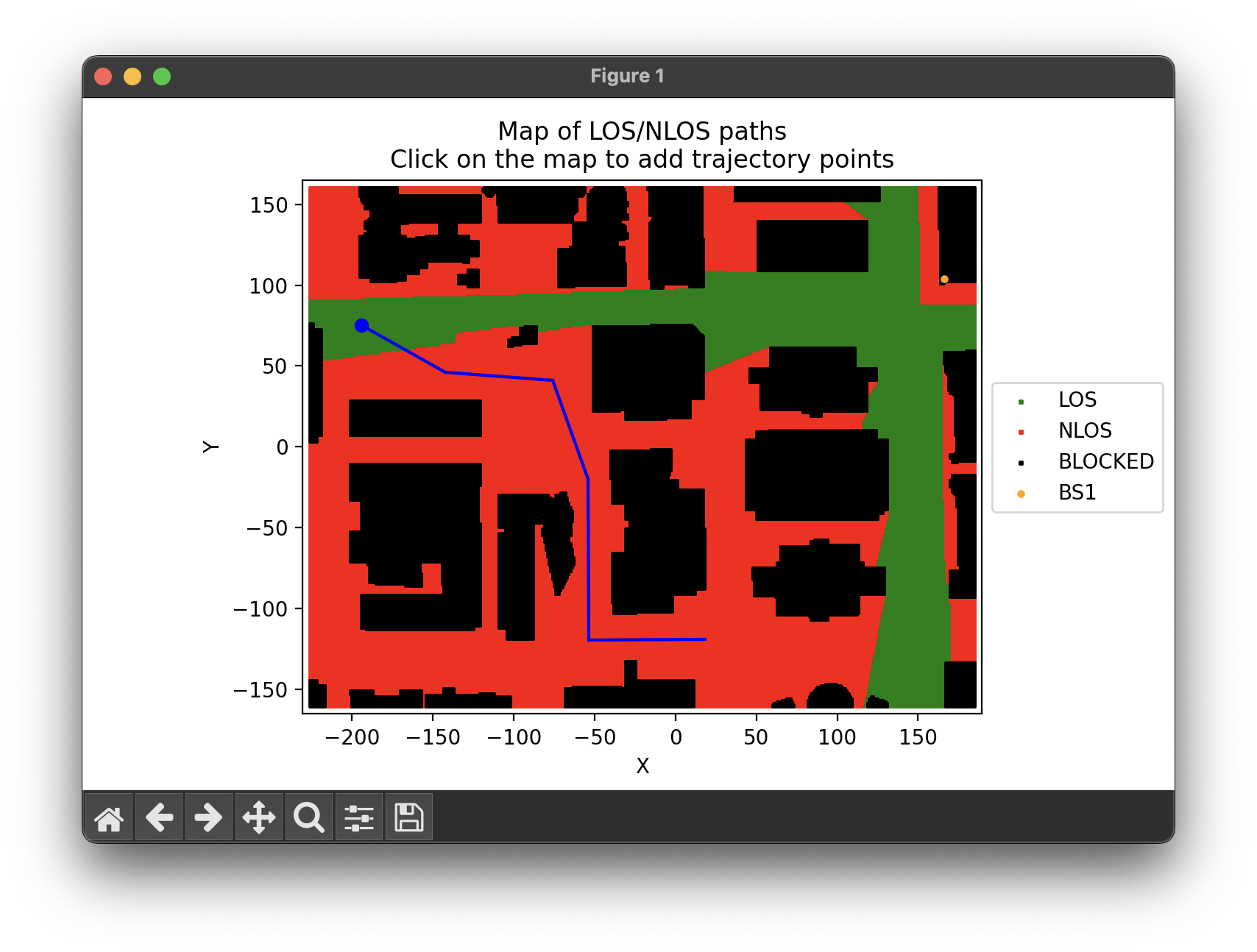
- interactiveTrajPoints(mapType='LOS-NLOS', backEnd='MacOSX', figSize=6)
This function enables you to create a trajectory by selecting points on the map. It opens a separate window displaying the scenario map. You can then click on the map points to create the trajectory. After each click, the map updates to show the current trajectory. To end the trajectory, simply close the window. This function returns the selected points after closing the map window. The function
trajectoryFromPoints()can then be used to create aTrajectoryobject based on the captured trajectory points. The notebook file Working with DeepMIMO Scenarios contains an example of using this function.- Parameters:
mapType (str) –
This specifies the type of map to be drawn by this function:
- LOS-NLOS:
The color used for each point depends on whether it has a line-of-sight path or if there is a total blockage at that point.
- 1stPathDelays:
The color used for each point depends on the amount of delay for the strongest path at that point.
- 1stPathPowers:
The color used for each point depends on the path power for the strongest path at that point.
backEnd (str) – The name of the interactive backend to be used by the matplotlib library. For more information, please refer to matplotlib backends. The default backend is “MacOSX”.
figSize (float) – This value determines the approximate size of the drawn map. If the maximum of the map’s width and height are less than the specified value, the map is scaled to match the specified size. The default value is set to
6.
- Returns:
A NumPy array of shape
(N, 2)containing the[x, y]coordinates (in the scenario’s local map coordinates) of theNpoints clicked on the map, in the order they were clicked.- Return type:
NumPy array
Example:
The code below can be used to generate a trajectory of points for the “asu_campus1” scenario. The image below illustrates the current trajectory, depicted by blue lines, and the starting point, marked by a small blue circle.
deepMimoData = DeepMimoData("asu_campus1", baseStationId=1, gridId=0)
points = deepMimoData.interactiveTrajPoints(mapType="LOS-NLOS")
- trajectoryFromPoints(points, bwp, speedMps=None)
Creates and returns a
Trajectoryobject based on the given trajectory points and parameters. Please refer to the notebook Working with DeepMIMO Scenarios for an example that uses this function.- Parameters:
points (NumPy array) – This array of 2-D points on the current scenario map specifies the trajectory. The
interactiveTrajPoints()function can be used to obtain these points interactively.bwp (
BandwidthPart) – The bandwidth part used to determine the timing of the interpolated trajectory points. This implementation generates one interpolated trajectory point for each communication slot.speedMps (float or None) – If provided, it specifies the trajectory speed in meters per second. If not provided, the speed is automatically determined based on the scenario type (indoor vs. outdoor). The current implementation uses an average walking speed of 1.2 m/s for indoor scenarios and 14 m/s for outdoor scenarios (which corresponds to a car moving at 31.32 miles per hour). Note that the actual linear speed on the trajectory may not be precisely equal to this value due to the approximations in the calculations.
- Returns:
A
Trajectoryobject containing all the information about the created trajectory- Return type:
- channelForPoints(points, bwp, **kwargs)
Create and return a channel model representing the channel between the base station and a set of specified points on the scenario map. The returned channel model can be used to compute channel matrices or to process time- or frequency-domain signals.
The
pointsargument may be a singleTrjPointobject, a list ofTrjPointobjects, or a list of x–y coordinates given as tuples(x, y).Note that although the returned object is an instance of
TrjChannel, it does not represent a UE moving along a trajectory. The points are treated as independent samples with no temporal relationship between them. The methodgoNext()can be used to iterate over the points sequentially.- Parameters:
points (list or
TrjPoint) – A singleTrjPoint, a list of such objects, or a list of x–y coordinate tuples(x, y).bwp (
BandwidthPart) – The bandwidth part used by the returned channel model.kwargs (dict) –
Additional optional parameters used by the channel model:
- normalizeGains:
If True (default), path gains are normalized.
- normalizeOutput:
If True (default), gains are normalized based on the number of receive antennas.
- normalizeDelays:
If True (default), delays are normalized as specified in Step 3 of 3GPP TR 38.901, Section 8.4. Otherwise, the original delays obtained from ray tracing are used.
- filterLen:
Length of the channel filter (default: 16 samples).
- delayQuantSize:
Quantization size for fractional delays in the channel filter (default: 64).
- stopBandAtten:
Stopband attenuation (in dB) used by the channel filter (default: 80 dB).
- txAntenna:
Transmit antenna, an instance of
AntennaPanelorAntennaArray. By default, a single vertically polarized antenna (1×1 panel) is used.- rxAntenna:
Receive antenna, an instance of
AntennaPanelorAntennaArray. By default, a single vertically polarized antenna (1×1 panel) is used.- txOrientation:
Transmitter antenna orientation as three angles (degrees): bearing \(\alpha\), downtilt \(\beta\), and slant \(\gamma\). Default is
[0, 0, 0]. See 3GPP TR 38.901, Section 7.1.3.- rxOrientation:
Receiver antenna orientation as three angles (degrees): bearing \(\alpha\), downtilt \(\beta\), and slant \(\gamma\). Default is
[0, 0, 0]. See 3GPP TR 38.901, Section 7.1.3.- xPolPower:
Cross-polarization power (in dB). Default is 10 dB, defined as \(X = 10 \log_{10} \kappa^{RT}\), where \(\kappa^{RT}\) is the cross-polarization ratio (XPR). In the current implementation, this value is applied to all paths.
- ueSpeed:
UE speed at each point. If provided, it must be a list of 3D velocity vectors corresponding to the points in
points.
- Returns:
A channel object that provides channel information between the base station and each specified point.
- Return type:
Refer to the notebook Beam Sweeping in a DeepMIMO Scenario for an example of using this function.
- getChanGen(numChannels, bwp, los=None, minDist=0, maxDist=inf, minX=-inf, minY=-inf, maxX=inf, maxY=inf, **kwargs)
Samples random points from the current scenario based on the specified criteria and returns a generator object that can generate channel matrices corresponding to those random points.
The indices of the random points can be retrieved using the
pointIdxproperty of the returned generator object. These point indices can then be passed to thedrawMap()method as an “overlay” to be displayed on the map.Refer to the notebook Generating Random Channel Matrices from a DeepMIMO Scenario for an example of using this method.
- Parameters:
numChannels (int) – This is the number of channel matrices generated by the returned generator, which is equal to the number of points sampled from all the points on the grid of the current scenario. However, it disregards points with total blockage (i.e., points with no paths to the base station). If the given filter criteria result in insufficient points being available in the current scenario, the number of points sampled (and consequently, the number of channels generated) may be less than
numChannels.bwp (
BandwidthPart) – The bandwidth part object used by the returned generator to construct channel matrices.los (bool or None) –
It can be set to None, True, or False.
If set to None, the sampled points are not filtered based on their line-of-sight communication path (default).
If set to True, only the points with a line-of-sight communication path to the base station are considered.
If set to False, only the points without a line-of-sight communication path to the base station are considered.
minDist (float) – If specified, this parameter determines the minimum distance between the points and the base station. Points closer than this value will not be considered. The default is
0which effectively disables this filter.maxDist (float) – If specified, this parameter determines the maximum distance between the points and the base station. Points farther than this specified value will not be considered. By default, this parameter is set to
np.inf, which effectively disables this filter.minX (float) – If specified, this parameter determines a lower bound for the
xcoordinate of the points to consider. It can be used with other filters to limit the points to a specific region. By default, this parameter is set to-np.inf, which effectively disables this filter.minY (float) – If specified, this parameter determines a lower bound for the
ycoordinate of the points to consider. It can be used with other filters to limit the points to a specific region. By default, this parameter is set to-np.inf, which effectively disables this filter.maxX (float) – If specified, this parameter determines an upper bound for the
xcoordinate of the points to consider. It can be used with other filters to limit the points to a specific region. By default, this parameter is set tonp.inf, which effectively disables this filter.maxY (float) – If specified, this parameter determines an upper bound for the
ycoordinate of the points to consider. It can be used with other filters to limit the points to a specific region. By default, this parameter is set tonp.inf, which effectively disables this filter.kwargs (dict) –
Here is a list of additional optional parameters that can be used to further customize channel-matrix generation:
- normalizeGains:
If the default value of True is used, the path gains are normalized.
- normalizeOutput:
If the default value of True is used, the gains are normalized based on the number of receive antennas.
- normalizeDelays:
If the default value of True is used, the delays are normalized as specified in “Step 3” of 3GPP TR 38.901 section 8.4. Otherwise, the original delays obtained from ray-tracing are used.
- filterLen:
The length of the channel filter. The default is 16 samples.
- delayQuantSize:
The size of the delay fraction quantization for the channel filter. The default is 64.
- stopBandAtten:
The stop-band attenuation value (in dB) used by the channel filter. The default is 80 dB.
- txAntenna:
The transmitter antenna, which is an instance of either the
neoradium.antenna.AntennaPanelorneoradium.antenna.AntennaArrayclass. By default, it is a single antenna in a 1x1 antenna panel with vertical polarization.- rxAntenna:
The receiver antenna, which is an instance of either the
neoradium.antenna.AntennaPanelorneoradium.antenna.AntennaArrayclass. By default, it is a single antenna in a 1x1 antenna panel with vertical polarization.- txOrientation:
The orientation of the transmitter antenna. This is a list of 3 angle values in degrees for the bearing angle \(\alpha\), downtilt angle \(\beta\), and slant angle \(\gamma\). The default is [0,0,0]. Please refer to 3GPP TR 38.901 Section 7.1.3 for more information.
- rxOrientation:
The orientation of the receiver antenna. This is a list of 3 angle values in degrees for the bearing angle \(\alpha\), downtilt angle \(\beta\), and slant angle \(\gamma\). The default is [0,0,0]. Please refer to 3GPP TR 38.901 Section 7.1.3 for more information.
- xPolPower:
The cross-polarization power in dB. The default is 10 dB. It is defined as \(X=10 log_{10} \kappa^{RT}\) where \(\kappa^{RT}\) is the cross-polarization ratio (XPR). In the current implementation, this value is used for all paths.
- ueSpeed:
Specifies the speed of the UE. It can be one of the following:
If it is a tuple of the form
(speedMin, speedMax), at each point a random speed is sampled uniformly betweenspeedMinandspeedMax.If it is a list of the form [\(s_1\), \(s_2\), …, \(s_n\)], at each point a random speed is picked from those specified in the list.
If it is a single number, then the same UE speed is used at all points.
The default is
(0, 20).- ueDir:
Specifies the direction of UE movement in the X-Y plane as an angle in degrees. It can be one of the following:
If it is a tuple of the form
(dirMin, dirMax), at each point a random angle is sampled uniformly betweendirMinanddirMax.If it is a list of the form [\(a_1\), \(a_2\), …, \(a_n\)], at each point a random angle is picked from those specified in the list.
If it is a single number, then the same UE direction is used at all points.
The default is
(0, 360).
- Return type:
ChanGen, a generator object that is used to generate channel matrices.
Example:
deepMimoData = DeepMimoData("asu_campus_3p5", baseStationId=1, gridId=0)
carrier = Carrier(startRb=0, numRbs=25, spacing=15) # Carrier with 25 PRBs, 15 kHz subcarrier spacing

# Create 100 channel matrices
chanGen = deepMimoData.getChanGen(100,
                                  carrier.curBwp,   # Bandwidth Part
                                  los=False,        # Include only non-line-of-sight channels
                                  minDist=200,      # With distances to the base station between 200
                                  maxDist=250,      # and 250 meters
                                  maxX=100,         # With maximum x coordinate of 100 meters
                                  seed=123)         # Reproducible results
allChannels = np.stack([chan for chan in chanGen])  # Create the channel matrices
print(allChannels.shape)                            # Prints (100, 14, 300, 1, 1)