Antenna
NeoRadium supports the antenna elements, panels, and arrays as defined in the 3-GPP standard TR 38.901. Using this API, you can easily create antenna arrays and study their characteristics.
Example
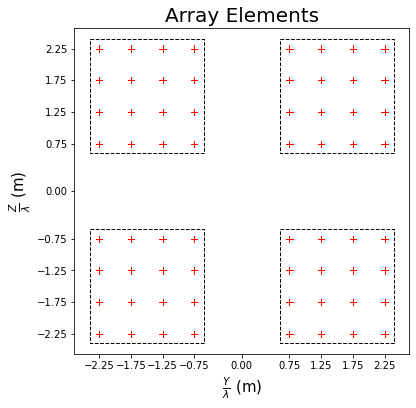
elementTemplate = AntennaElement(beamWidth=[65,65], maxAttenuation=30)
panelTemplate = AntennaPanel([4,4], elements=elementTemplate, polarization="+")
antennaArray = AntennaArray([2,2], spacing=[3,3], panels=panelTemplate)
antennaArray.showElements(zeroTicks=True)
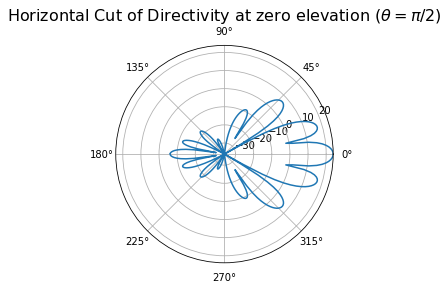
antennaArray.drawRadiation(theta=90, radiationType="Directivity", normalize=False)
This file contains the implementation of Antenna Elements, Panels, and Arrays.
Note
NeoRadium distinguishes between physical antenna elements and logical CSI-RS ports. When using the
AntennaPanel class, physical and logical antennas are treated as identical (i.e., each physical
element corresponds directly to one logical transmit dimension and the internal mapping matrix B is the
identity). This is suitable for fully digital MIMO simulations. When using the AntennaArray class,
the array consists of multiple physical panels, and each physical panel/polarization is mapped to one logical
CSI-RS port through an internal port-to-element mapping matrix B. This provides a reduced-dimension logical
transmit space, similar to subarray or hybrid beamforming architectures. Users may optionally override the default
mapping and provide a custom B matrix to model alternative beamforming or hardware implementations.
- class neoradium.antenna.AntennaBase(**kwargs)
This is the base class for all Antenna objects in NeoRadium. The classes
AntennaElement,AntennaArray, andAntennaPanelare all derived from this class.- getSteeringVector(theta, phi)
This method calculates the steering vector (also known as the Array Response) of an Antenna Array or Antenna Panel for the given Azimuth and Zenith angles. Note that this function can only be called on the
AntennaPanelandAntennaArrayclasses. An exception is thrown if it is called onAntennaElementobjects.Note
This function returns the receiver steering vector. To use it for a transmitter, you need to use the complex conjugate of the returned value.
- Parameters:
theta (NumPy array) – A 1-D array of zenith angles in degrees. (between 0 and 180)
phi (NumPy array) – A 1-D array of azimuth angles in degrees. (between -180 and 180)
- Returns:
A 3-D complex NumPy array containing steering vectors for every combination of theta and phi. The shape of the output is (numElements, numTheta, numPhi).
- Return type:
NumPy array
- getFieldPattern(theta=None, phi=None)
This method is used to calculate the field patterns around an antenna panel or array in the directions given by the arguments
thetaandphi.- Parameters:
theta (list, tuple, NumPy array, scalar, or None) –
If this is a list or NumPy array, it specifies the zenith angles (in degrees) used to calculate the fields.
If this is a tuple, the values are assumed to specify the range of values used for zenith angles (in degrees)
If this is a scalar value, the fields are calculated only for the single specified zenith angle (in degrees)
If this is None, the fields are calculated for all zenith angles between 0 and 180 degrees.
phi (list, tuple, NumPy array, scalar, or None) –
If this is a list or NumPy array, it specifies the azimuth angles (in degrees) used to calculate the fields.
If this is a tuple, the values are assumed to specify the range of values used for azimuth angles (in degrees)
If this is a scalar value, the fields are calculated only for the single specified azimuth angle (in degrees)
If this is None, the fields are calculated for all azimuth angles between -180 and 180 degrees.
- Returns:
A 3-D complex NumPy array containing steering vectors for each combination of
thetaandphi. The shape of the output is (numElements, numTheta, numPhi)- Return type:
NumPy array
- getPolarizedFields(theta=None, phi=None, weights=None)
This method calculates the polarized fields and outputs 2 matrices of the field values for vertical and horizontal polarizations.
- Parameters:
theta (list, tuple, NumPy array, scalar, or None) –
If this is a list or NumPy array, it specifies the zenith angles (in degrees) used to calculate the fields.
If this is a tuple, the values are assumed to specify the range of values used for zenith angles (in degrees)
If this is a scalar value, the fields are calculated only for the single specified zenith angle (in degrees)
If this is None, the fields are calculated for all zenith angles between 0 and 180 degrees.
phi (list, tuple, NumPy array, scalar, or None) –
If this is a list or NumPy array, it specifies the azimuth angles (in degrees) used to calculate the fields.
If this is a tuple, the values are assumed to specify the range of values used for azimuth angles (in degrees)
If this is a scalar value, the fields are calculated only for the single specified azimuth angle (in degrees)
If this is None, the fields are calculated for all azimuth angles between -180 and 180 degrees.
weights (NumPy array) – A vector of weights to be applied to the field values. The weights can be used to steer the beams to the desired direction. If this is None, the field pattern is returned without any beamforming.
- Returns:
- arrayFieldV:
A NumPy array of shape (numTheta x numPhi) containing the field values with vertical polarization at directions specified by
thetaandphi.
- arrayFieldH:
A NumPy array of shape (numTheta x numPhi) containing the field values with horizontal polarization at directions specified by
thetaandphi.
- Return type:
2 NumPy arrays
- getField(theta=None, phi=None, weights=None)
This method calculates the fields in directions specified by
thetaandphi. It calls thegetPolarizedFields()method to get the vertical and horizontal polarized fields and combines them to get fields at the specified directions.\[F = \sqrt {F_v^2 + F_h^2}\]- Parameters:
theta (list, tuple, NumPy array, scalar, or None) –
If this is a list or NumPy array, it specifies the zenith angles (in degrees) used to calculate the fields.
If this is a tuple, the values are assumed to specify the range of values used for zenith angles (in degrees)
If this is a scalar value, the fields are calculated only for the single specified zenith angle (in degrees)
If this is None, the fields are calculated for all zenith angles between 0 and 180 degrees.
phi (list, tuple, NumPy array, scalar, or None) –
If this is a list or NumPy array, it specifies the azimuth angles (in degrees) used to calculate the fields.
If this is a tuple, the values are assumed to specify the range of values used for azimuth angles (in degrees)
If this is a scalar value, the fields are calculated only for the single specified azimuth angle (in degrees)
If this is None, the fields are calculated for all azimuth angles between -180 and 180 degrees.
weights (NumPy array) – A vector of weights to be applied to the field values. The weights can be used to steer the beams to the desired direction. If this is None, the field pattern is returned without any beamforming.
- Returns:
A NumPy array of shape (numTheta x numPhi) containing the field values at the directions specified by
thetaandphi.- Return type:
NumPy array
- getPowerPattern(theta=None, phi=None, weights=None)
This method calculates the field power pattern in the directions specified by
thetaandphi. It calls thegetField()method to get the fields then calculates the field powers.- Parameters:
theta (list, tuple, NumPy array, scalar, or None) –
If this is a list or NumPy array, it specifies the zenith angles (in degrees) used to calculate the field powers.
If this is a tuple, the values are assumed to specify the range of values used for zenith angles (in degrees)
If this is a scalar value, the field power is calculated only for the single specified zenith angle (in degrees)
If this is None, the field powers are calculated for all zenith angles between 0 and 180 degrees.
phi (list, tuple, NumPy array, scalar, or None) –
If this is a list or NumPy array, it specifies the azimuth angles (in degrees) used to calculate the field powers.
If this is a tuple, the values are assumed to specify the range of values used for azimuth angles (in degrees)
If this is a scalar value, the field power is calculated only for the single specified azimuth angle (in degrees)
If this is None, the field powers are calculated for all azimuth angles between -180 and 180 degrees.
weights (NumPy array) – A vector of weights to be applied to the field values. The weights can be used to steer the beams to the desired direction. If this is None, the field pattern is returned without any beamforming.
- Returns:
A NumPy array of shape (numElements x numTheta x numPhi) containing the field powers at the directions specified by
thetaandphi.- Return type:
NumPy array
- getPowerPatternDb(theta=None, phi=None, weights=None)
This method calculates the field power pattern (in dB) in the directions specified by
thetaandphi. It calls thegetPowerPattern()method to get the field powers and then converts them to dB.- Parameters:
theta (list, tuple, NumPy array, scalar, or None) –
If this is a list or NumPy array, it specifies the zenith angles (in degrees) used to calculate the field powers.
If this is a tuple, the values are assumed to specify the range of values used for zenith angles (in degrees)
If this is a scalar value, the field power is calculated only for the single specified zenith angle (in degrees)
If this is None, the field powers are calculated for all zenith angles between 0 and 180 degrees.
phi (list, tuple, NumPy array, scalar, or None) –
If this is a list or NumPy array, it specifies the azimuth angles (in degrees) used to calculate the field powers.
If this is a tuple, the values are assumed to specify the range of values used for azimuth angles (in degrees)
If this is a scalar value, the field power is calculated only for the single specified azimuth angle (in degrees)
If this is None, the field powers are calculated for all azimuth angles between -180 and 180 degrees.
weights (NumPy array) – A vector of weights to be applied to the field values. The weights can be used to steer the beams to the desired direction. If this is None, the field pattern is returned without any beamforming.
- Returns:
A NumPy array of shape (numElements x numTheta x numPhi) containing the field powers in dB at the directions specified by
thetaandphi.- Return type:
NumPy array
- getDirectivity(theta=None, phi=None, weights=None)
Directivity at a specific direction is defined as:
\[D = \frac {P} {P_{avg}}\]where \(P\) is the power radiated at the specified angle and \(P_{avg}\) is the average power radiated in all directions. The average power is calculated by integrating the field values at all angles (See this web page for more details):
\[P_{avg} = \frac {1} {4 \pi} \int_0^{2 \pi} \int_0^{\pi} |F(\theta, \phi)|^2 \sin \theta d\theta d\phi\]Directivity (without any specific direction) is defined as:
\[D_{max} = \frac {P_{max}} {P_{avg}}\]where \(P_{max}\) is the maximum power radiated at a direction. Directivity is usually measured in dBi which is the relative directivity in dB with respect to an “isotropic” radiator.
This method calculates the directivity (in dbi) at directions specified by
thetaandphi.- Parameters:
theta (list, tuple, NumPy array, scalar, or None) –
If this is a list or NumPy array, it specifies the zenith angles (in degrees) used to calculate the directivity.
If this is a tuple, the values are assumed to specify the range of values used for zenith angles (in degrees)
If this is a scalar value, the directivity is calculated only for the single specified zenith angle (in degrees)
If this is None, the directivity is calculated for all zenith angles between 0 and 180 degrees.
phi (list, tuple, NumPy array, scalar, or None) –
If this is a list or NumPy array, it specifies the azimuth angles (in degrees) used to calculate the directivity.
If this is a tuple, the values are assumed to specify the range of values used for azimuth angles (in degrees)
If this is a scalar value, the directivity is calculated only for the single specified azimuth angle (in degrees)
If this is None, the directivity is calculated for all azimuth angles between -180 and 180 degrees.
weights (NumPy array) – A vector of weights to be applied to the field values. The weights can be used to steer the beams to the desired direction. If this is None, the field pattern is returned without any beamforming.
- Returns:
A NumPy array of shape (numElements x numTheta x numPhi) containing the directivity in dBi at the directions specified by
thetaandphi.- Return type:
NumPy array
- drawRadiation(theta=None, phi=None, radiationType='Directivity', normalize=True, title=None, viewAngles=(45, 20), figSize=6.0, ax=None, weights=None)
This is a multi-purpose visualization function that shows the radiation around antenna elements, panels, and arrays in the directions specified by
thetaandphi.- Parameters:
theta (list, tuple, NumPy array, scalar, or None) –
If this is a list or NumPy array, it specifies the zenith angles (in degrees) used to visualize the radiations.
If this is a tuple, the values are assumed to specify the range of values used for zenith angles (in degrees)
If this is a scalar value, the radiations are visualized only for the single specified zenith angle (in degrees)
If this is None, the radiations are visualized for all zenith angles between 0 and 180 degrees.
phi (list, tuple, NumPy array, scalar, or None) –
If this is a list or NumPy array, it specifies the azimuth angles (in degrees) used to visualize the radiations.
If this is a tuple, the values are assumed to specify the range of values used for azimuth angles (in degrees)
If this is a scalar value, the radiations are visualized only for the single specified azimuth angle (in degrees)
If this is None, the radiations are visualized for all azimuth angles between -180 and 180 degrees.
radiationType (str) –
This parameter specifies the type of radiation to plot. Here is a list of supported values:
Directivity (default)
Power
PowerDb
Field
normalize (bool) – If True (default) all the values are normalized before being plotted.
str (title) – The title to be used for the plot. If not specified, then this function creates a title based on the given parameters.
viewAngles (tuple) – For 3-D plots, you can use this parameter to specify your desired viewing angle. For non-3D plots, this parameter is ignored. The default is
(45,20).figSize (float) – The figure size. Use this to control size of the plot. The default is 6.0.
ax (matplotlib.axes.Axes or None) –
If specified, it must be a matplotlib
Axisobject on which the radiation pattern is drawn. This can be used to create a group of matplotlib subplots and draw the radiation pattern in one of the subplots. For example:panel = AntennaPanel([4,4], polarization="x") fig, ax = plt.subplots(1,2, layout='constrained', subplot_kw={'projection': 'polar'}) panel.drawRadiation(theta=90, radiationType="Field", normalize=False, title="Horizontal cut", ax=ax[0]) panel.drawRadiation(phi=0, radiationType="Field", normalize=False, title="Vertical cut", ax=ax[1])
weights (NumPy array) – A vector of weights to be applied to the radiation pattern. The weights can be used to steer the beams to the desired direction. If this is None, beamforming is disabled.
- Returns:
The matplotlib
Axisobject used to draw the radiation pattern.- Return type:
Plot Types:
- Horizontal Cut at specified elevation:
For this case, specify one
thetavalue and include all azimuth angles (\(-\pi < \phi < \pi\)). One common use case is the horizontal cut at zero elevation (\(\theta = \pi / 2\)).- Vertical Cut at specified azimuth:
For this case, specify one
phivalue and include all zenith angles (\(0 < \theta < \pi\)). One common use case is the vertical cut at zero azimuth (\(\phi = 0\)).- 3-D pattern:
For this case, specify the complete range for both
thetaandphi(\(0 < \theta < \pi\) and \(-\pi < \phi < \pi\)). This is the default case if boththetaandphiare not specified.
- classmethod getRotationMatrix(orientation)
This class method calculates and returns the forward composite rotation matrix used to convert coordinates from the local to the global system. It is important to note that since the rotation matrix is orthogonal, its inverse matrix is the same as its transpose, which can be used to convert from the global to the local coordinate system. For more information, please refer to 3GPP TR 38.901 equation (7.1-4).
- Parameters:
orientation (list or NumPy array) – A list or NumPy array containing the orientation angles \(\alpha\) (bearing angle), \(\beta\) (downtilt angle), and \(\gamma\) (slant angle) in degrees.
- Returns:
A 3x3 rotation matrix that is used to transform the local coordinates to global coordinates.
- Return type:
NumPy array
- classmethod local2Global(theta, phi, orientation)
This class method converts a set of local angles to their corresponding global angles.
- Parameters:
theta (NumPy array) – A NumPy array containing the zenith angles (in degrees) in the local coordinate system.
phi (NumPy array) – A NumPy array containing the azimuth angles (in degrees) in the local coordinate system.
orientation (list or NumPy array) – A list or NumPy array containing the orientation angles \(\alpha\) (bearing angle), \(\beta\) (downtilt angle), and \(\gamma\) (slant angle) in degrees.
- Returns:
A tuple of
(thetaGlobal, phiGlobal)containing zenith and azimuth in the global coordinate system.thetaGlobalandphiGlobalare the same shape asthetaandphi.- Return type:
NumPy arrays
- classmethod global2Local(theta, phi, orientation)
This class method converts a set of global angles to their corresponding local angles.
- Parameters:
theta (NumPy array) – A NumPy array containing the zenith angles (in degrees) in the global coordinate system.
phi (NumPy array) – A NumPy array containing the azimuth angles (in degrees) in the global coordinate system.
orientation (list or NumPy array) – A list or NumPy array containing the orientation angles \(\alpha\) (bearing angle), \(\beta\) (downtilt angle), and \(\gamma\) (slant angle) in degrees.
- Returns:
A tuple of
(thetaLocal, phiLocal)containing zenith and azimuth in the local coordinate system.thetaLocalandphiLocalare the same shape asthetaandphi.- Return type:
NumPy arrays
- getElementsFields(theta, phi, orientation=array([0., 0., 0.]))
This method returns the electric fields used to calculate the channel response for different channel models. It returns polarized field values in the directions specified by the
thetaandphi. This function also handles the conversion from local to global coordinates using the rotation angles provided inorientation. Please refer to 3GPP TR 38.901 sections 7.1 and 7.5 for more details.- Parameters:
theta (NumPy array) – A 2-D NumPy array containing the zenith angles (in degrees) used to calculate the fields. This is an
nbymmatrix wherenis the number of clusters andmis the number of rays per cluster.phi (NumPy array) – A 2-D NumPy array containing the azimuth angles (in degrees) used to calculate the fields. This is an
nbymmatrix wherenis the number of clusters andmis the number of rays per cluster.orientation (list or NumPy array) – A list or NumPy array containing the orientation angles \(\alpha\) (bearing angle), \(\beta\) (downtilt angle), and \(\gamma\) (slant angle) in degrees.
- Returns:
- field:
A NumPy array of shape (n x m x numAntenna x 2) containing the field information for each antenna element and each one of
mrays in each one ofnclusters. The second dimension (2) is used to separate the vertical and horizontal polarization.
- locFactor:
A NumPy array of shape (n x m x numAntenna) containing the location factor. For more information please refer to 3GPP TR 38.901 equations 7.5-28 and 7.5-29.
- Return type:
2 NumPy arrays
- getSweepingBeams(numTheta, numPhi, thetaSpan=20, phiSpan=120, angleMethod='sincos', polStrategy='equal')
Generate a beam-sweeping grid of steering vectors.
This method constructs a grid of steering directions in the antenna’s local coordinate system and returns one steering vector per direction. For dual-polarized antenna panels/arrays, the steering vectors can either excite both polarizations equally (“equal”) or generate two sets of beams that probe the two polarizations independently (“probe”).
- Parameters:
numTheta (int) – Number of zenith (theta) directions in the sweep. If the panel/array has a single vertical element/panel (nV == 1), this is forced to 1.
numPhi (int) – Number of azimuth (phi) directions in the sweep. If the panel/array has a single horizontal element/panel (nH == 1), this is forced to 1.
float (thetaSpan) – Total sweep span in zenith (degrees) centered around 90° (broadside). Used when numTheta > 1. Default is 20.
optional – Total sweep span in zenith (degrees) centered around 90° (broadside). Used when numTheta > 1. Default is 20.
phiSpan (float, optional) – Total sweep span in azimuth (degrees) centered around 0° (broadside). Used when numPhi > 1. Default is 120.
angleMethod ({"sincos", "linear"}, optional) –
Angle grid generation method:
- ”sincos”:
uniform sampling in sin(phi) and cos(theta) domains (uniform in spatial-frequency space)
- ”linear”:
uniform sampling directly in degrees
Default is “sincos”.
polStrategy ({"equal", "probe"}, optional) –
Polarization strategy for dual-polarized antenna:
- ”equal”:
each beam excites both polarizations.
- ”probe”:
returns two beam sets; the first uses only the first polarization and the second uses only the second polarization (doubling the number of beams)
For single-polarized panels/arrays, this parameter is ignored. Default is “equal”.
- Returns:
steeringVectors (NumPy array) – Complex steering vector matrix of shape
(numPorts, numBeams), wherenumPortsis the number of antenna ports andnumBeamsis the number of sweeping beams. When polStrategy=”probe” on a dual-pol panel,numBeamsis doubled.beams (list) – Beam metadata as
[thetas, phis, pols], wherethetasandphishave lengthnumBeamsandpolsis a string of lengthnumBeamsdescribing the polarization label per beam.
Notes
All angles are in local panel coordinates. Use
AntennaBase.local2Global()if you need global angles for labeling/plotting.Broadside is assumed at theta=90° and phi=0° in the local coordinate system.
For
AntennaPanel,numPortsis equal to number of antenna elements. ForAntennaArray,numPortsis equal to number of panels for single-polarization and 2 times number of panels for dual polarization.The returned columns are unnormalized steering vectors, not power-normalized precoders. For single-polarized panels/arrays and for dual-polarized cases with
polStrategy="equal", each column has \(\|w\|^2 = N_{ports}\). ForpolStrategy="probe"(dual-polarized only), one polarization is zeroed per column, so \(\|w\|^2 = N_{ports}/2\) — a 3 dB power drop relative to the"equal"mode. If you use these as transmit precoders, apply your own normalization to control total transmit power, and account for the 3 dB gap when comparing beam metrics acrosspolStrategymodes.angleMethod="sincos"samples uniformly in sin(φ) and cos(θ), which gives roughly equal angular separation in beam space — the same intuition behind a DFT-based beam codebook and the natural choice when the goal is uniform beam coverage."linear"samples uniformly in degrees and is provided for the (less common) case where uniformly spaced angles are preferred over uniform beam spacing.On a dual-polarized antenna,
polStrategy="probe"returns2 * numTheta * numPhisteering-vector columns: the first half excites only the first polarization, the second half only the second. This doubles the number of beams compared topolStrategy="equal".
Refer to the notebook Beam Sweeping with Antenna Panels and Arrays for examples of using this function. See also
getProbingBeams()for refining a beam around a known direction.
- getProbingBeams(theta0, phi0, numBeams, polStrategy=None, maxSeparation=6, deltaTheta=5)
This method generates a set of beam-probing steering vectors around a reference direction
(theta0, phi0). It returns a matrix of beamforming weights and per-beam metadata (angles and polarization).- Parameters:
theta0 (float) – Reference zenith angle in degrees.
phi0 (float) – Reference azimuth angle in degrees.
numBeams (int) – Number of probe beams to generate. Must be one of {2, 4, 8}.
polStrategy ({"equal", "probe"}, optional) –
Polarization strategy:
- ”equal”:
each beam excites both polarizations.
- ”probe”:
split beams across polarizations (requires dual-polarization and
numBeams >= 4).
If None, a default is chosen based on
numBeamsand panel/array polarization.maxSeparation (float, optional) – Maximum azimuth separation (degrees) for horizontal probing. Default is 6.
deltaTheta (float, optional) – Zenith probing step size in degrees for vertical probing. Default is 5.
- Returns:
steeringVectors (NumPy array) – Complex steering vector matrix of shape
(numPorts, numBeams), wherenumPortsis the number of antenna ports andnumBeamsis the number of probing beams. When polStrategy=”probe” on a dual-pol panel,numBeamsis doubled.beams (list) – Beam metadata as
[thetas, phis, pols], wherethetasandphishave lengthnumBeamsandpolsis a string of lengthnumBeamsdescribing the polarization label per beam.
Notes
All angles are in local panel coordinates (same convention as
getSweepingBeams()). Broadside is at theta=90°, phi=0°.The returned columns are unnormalized steering vectors, not power-normalized precoders. For single-polarized panels/arrays and for dual-polarized cases with
polStrategy="equal", each column has \(\|w\|^2 = N_{ports}\). ForpolStrategy="probe"(dual-polarized only), one polarization is zeroed per column, so \(\|w\|^2 = N_{ports}/2\) — a 3 dB power drop relative to the"equal"mode. If you use these as transmit precoders, apply your own normalization to control total transmit power, and account for the 3 dB gap when comparing beam metrics acrosspolStrategymodes.Probing is intended to refine a beam selection around a known reference direction
(theta0, phi0)— for example, after a coarse sweep withgetSweepingBeams()has picked a best beam,getProbingBeamsgenerates a small set of nearby beams to test for a finer choice.The probe topology depends on
numBeams, the panel/array shape, andpolStrategy. The internal split into horizontal (nH), vertical (nV), and polarization (nP) probes is chosen so thatnH + nV + nP == numBeams(or2 * (nH + nV)columns when polarization is split). See the source for the exact mapping.maxSeparationclamps how far each horizontal probe deviates fromphi0in degrees, keeping probes near the reference direction.deltaThetaplays the same role for the zenith probes; zenith uses a fixed step in degrees rather than uniform sin/cos sampling because the relevant range is centered around 90° where sin-domain sampling degenerates.polStrategy="probe"requires a dual-polarized antenna andnumBeams >= 4. With this option the spatial beam count is halved so the total number of returned beams stays atnumBeams.
See also
getSweepingBeams()for the coarse-grid version.
- class neoradium.antenna.AntennaElement(**kwargs)
This class implements the functionality of an antenna element. This implementation is based on 3GPP TR 38.901 Section 7.3.
- Parameters:
kwargs (dict) –
A set of optional arguments. If you are creating a single antenna element object, most of the time you do not need to specify any parameters; the default values are sufficient for normal functionality. Here is a list of supported parameters:
- position:
A list of 3 values (x, y, and z) specifying the position of this element in the
AntennaPanelcontaining this element.- freqRange:
A list of 2 values specifying the range of frequencies in which this antenna element operates.
- polAngle:
The polarization angle of this antenna element in degrees. A value of 0° means it is purely vertically polarized.
- polModel:
The polarization model (1 or 2). The default is 1. Please refer to TR38.901 Section 7.3.2 for more details.
- beamWidth:
A list of 2 values specifying the beam width of this antenna element in degrees. The default is
[65,65]. These values correspond to \(\theta_{3dB}\) and \(\phi_{3dB}\) in TR38.901-Table 7.3-1.Note
To make the antenna element omnidirectional, set \(\phi_{3dB}\) to 360 degrees. The following code shows how to create an omnidirectional antenna element:
import neoradium as nr
# Create an omnidirectional antenna element with θ(3dB)=75°
el = nr.AntennaElement(beamWidth=[75,360])
- verticalSidelobeAttenuation:
Vertical side-lobe attenuation (\(SLA_V\)). The default is 30. Please refer to TR38.901-Table 7.3-1 for more details.
- maxAttenuation:
Maximum Attenuation (\(A_{max}\)) in dB. The default is 30. Please refer to TR38.901-Table 7.3-1 for more details.
- mainMaxGain:
Maximum gain of main lobe in dBi. The default is 8. Please refer to TR38.901-Table 7.3-1 for more details.
- panel:
The
AntennaPanelobject containing this element.
- print(indent=0, title=None, getStr=False)
Prints the properties of this
AntennaElementobject.- Parameters:
indent (int) – The number of indentation characters.
title (str or None) – If specified, it is used as the title for the printed information. If None (the default), the text “Antenna Element:” is used for the title.
getStr (bool) – If True, returns a string instead of printing it.
- Returns:
If the
getStrparameter is True, then this function returns the information in a string. Otherwise, nothing is returned.- Return type:
None or str
- property posInArray
Returns the position of this element in the
AntennaArrayobject.- Returns:
An array of 3 values (x, y, and z) specifying the position of this element in the
AntennaArrayobject.- Return type:
NumPy array
- clone(position, polAngle, panel)
Creates a copy of this
AntennaElementobject and modifies theposition, polarization angle (polAngle), and thepanelobject based on the parameters provided.- Parameters:
position (list or NumPy Array) – A list of 3 values (x, y, and z) specifying the position to be used for the cloned
AntennaElement.polAngle (float) – The polarization angle of the cloned
AntennaElementin degrees.panel (
AntennaPanel) – TheAntennaPanelobject containing the clonedAntennaElement.
- Returns:
The cloned
AntennaElement.- Return type:
- getPowerPatternDb(theta=None, phi=None, weights=None)
This method calculates the field power pattern (in dB) in the directions specified by
thetaandphi. This function is implemented based on TR38.901-Table 7.3-1.- Parameters:
theta (list, tuple, NumPy array, scalar, or None) –
If this is a list or NumPy array, it specifies the zenith angles (in degrees) used to calculate the field powers.
If this is a tuple, the values are assumed to specify the range of values used for zenith angles (in degrees)
If this is a scalar value, the field power is calculated only for the single specified zenith angle (in degrees)
If this is None, the field powers are calculated for all zenith angles between 0 and 180 degrees.
phi (list, tuple, NumPy array, scalar, or None) –
If this is a list or NumPy array, it specifies the azimuth angles (in degrees) used to calculate the field powers.
If this is a tuple, the values are assumed to specify the range of values used for azimuth angles (in degrees)
If this is a scalar value, the field power is calculated only for the single specified azimuth angle (in degrees)
If this is None, the field powers are calculated for all azimuth angles between -180 and 180 degrees.
weights (None) – Ignored for AntennaElement objects.
- Returns:
If
thetaandphihave the same shape, the returned value has the same shape asthetaandphiand contains the field powers in dB at the directions specified bythetaandphi. Otherwise, a NumPy array of shape (numTheta x numPhi) is returned, containing the field powers in dB at all combinations ofthetaandphi.- Return type:
NumPy array
- getPowerPattern(theta=None, phi=None, weights=None)
This method calculates the field power pattern in the directions specified by
thetaandphi. This function calls theAntennaElement.getPowerPatternDb()and converts the results from dB to linear representation.- Parameters:
theta (list, tuple, NumPy array, scalar, or None) –
If this is a list or NumPy array, it specifies the zenith angles (in degrees) used to calculate the field powers.
If this is a tuple, the values are assumed to specify the range of values used for zenith angles (in degrees)
If this is a scalar value, the field power is calculated only for the single specified zenith angle (in degrees)
If this is None, the field powers are calculated for all zenith angles between 0 and 180 degrees.
phi (list, tuple, NumPy array, scalar, or None) –
If this is a list or NumPy array, it specifies the azimuth angles (in degrees) used to calculate the field powers.
If this is a tuple, the values are assumed to specify the range of values used for azimuth angles (in degrees)
If this is a scalar value, the field power is calculated only for the single specified azimuth angle (in degrees)
If this is None, the field powers are calculated for all azimuth angles between -180 and 180 degrees.
weights (None) – Ignored for the AntennaElements.
- Returns:
If
thetaandphihave the same shape, the returned value has the same shape asthetaandphiand contains the field powers at the directions specified bythetaandphi. Otherwise, a NumPy array of shape (numTheta x numPhi) is returned, containing the field powers at all combinations ofthetaandphi.- Return type:
NumPy array
- getField(theta=None, phi=None, weights=None)
This method calculates the fields in specified directions, given by
thetaandphi. It calls theAntennaElement.getPowerPatternDb()method and converts the results to field values. It’s important to note that this function assumes vertically polarized antenna elements and returns the fields in vertical orientations only. Use theAntennaElement.getPolarizedFields()method to get the polarized fields.- Parameters:
theta (list, tuple, NumPy array, scalar, or None) –
If this is a list or NumPy array, it specifies the zenith angles (in degrees) used to calculate the fields.
If this is a tuple, the values are assumed to specify the range of values used for zenith angles (in degrees)
If this is a scalar value, the fields are calculated only for the single specified zenith angle (in degrees)
If this is None, the fields are calculated for all zenith angles between 0 and 180 degrees.
phi (list, tuple, NumPy array, scalar, or None) –
If this is a list or NumPy array, it specifies the azimuth angles (in degrees) used to calculate the fields.
If this is a tuple, the values are assumed to specify the range of values used for azimuth angles (in degrees)
If this is a scalar value, the fields are calculated only for the single specified azimuth angle (in degrees)
If this is None, the fields are calculated for all azimuth angles between -180 and 180 degrees.
weights (None) – Ignored for the AntennaElements.
- Returns:
If
thetaandphihave the same shape, the returned value has the same shape asthetaandphiand contains the electric field at the directions specified bythetaandphi. Otherwise, a NumPy array of shape (numTheta x numPhi) is returned, containing the electric field at all combinations ofthetaandphi.- Return type:
NumPy array
- getPolarizedFields(theta, phi, weights=None)
This method calculates the polarized fields and outputs two matrices of the field values for vertical and horizontal polarizations.
- Parameters:
theta (list, tuple, NumPy array, scalar, or None) –
If this is a list or NumPy array, it specifies the zenith angles (in degrees) used to calculate the fields.
If this is a tuple, the values are assumed to specify the range of values used for zenith angles (in degrees)
If this is a scalar value, the fields are calculated only for the single specified zenith angle (in degrees)
If this is None, the fields are calculated for all zenith angles between 0 and 180 degrees.
phi (list, tuple, NumPy array, scalar, or None) –
If this is a list or NumPy array, it specifies the azimuth angles (in degrees) used to calculate the fields.
If this is a tuple, the values are assumed to specify the range of values used for azimuth angles (in degrees)
If this is a scalar value, the fields are calculated only for the single specified azimuth angle (in degrees)
If this is None, the fields are calculated for all azimuth angles between -180 and 180 degrees.
weights (None) – Ignored for the AntennaElements.
- Returns:
If
thetaandphihave the same shape, the following returned values are also the same shape asthetaandphi. Otherwise, two NumPy arrays of shape (numTheta x numPhi) are returned.- arrayFieldV:
A NumPy array containing the field values with vertical polarization at the directions specified by
thetaandphi.
- arrayFieldH:
A NumPy array containing the field values with horizontal polarization at the directions specified by
thetaandphi.
- Return type:
2 NumPy arrays
- getDirectivity(theta=None, phi=None, weights=None)
Directivity at a specific direction is defined as:
\[D = \frac {P} {P_{avg}}\]where \(P\) is the power radiated at the specified angle and \(P_{avg}\) is the average power radiated in all directions. The average power is calculated by integrating the field values at all angles: (See this web page for more details)
\[P_{avg} = \frac {1} {4 \pi} \int_0^{2 \pi} \int_0^{\pi} |F(\theta, \phi)|^2 \sin \theta d\theta d\phi\]Directivity (without any specific direction) is defined as:
\[D_{max} = \frac {P_{max}} {P_{avg}}\]where \(P_{max}\) is the maximum power radiated at a given direction. Directivity is usually measured in dBi which is the relative directivity in dB with respect to an “isotropic” radiator.
This method calculates the directivity (in dBi) at directions specified by
thetaandphi.- Parameters:
theta (list, tuple, NumPy array, scalar, or None) –
If this is a list or NumPy array, it specifies the zenith angles (in degrees) used to calculate the directivity.
If this is a tuple, the values are assumed to specify the range of values used for zenith angles (in degrees)
If this is a scalar value, the directivity is calculated only for the single specified zenith angle (in degrees)
If this is None, the directivity is calculated for all zenith angles between 0 and 180 degrees.
phi (list, tuple, NumPy array, scalar, or None) –
If this is a list or NumPy array, it specifies the azimuth angles (in degrees) used to calculate the directivity.
If this is a tuple, the values are assumed to specify the range of values used for azimuth angles (in degrees)
If this is a scalar value, the directivity is calculated only for the single specified azimuth angle (in degrees)
If this is None, the directivity is calculated for all azimuth angles between -180 and 180 degrees.
weights (NumPy array) – This parameter is ignored by the
AntennaElementobjects.
- Returns:
If
thetaandphihave the same shape, the returned value has the same shape asthetaandphiand contains the directivity at the directions specified bythetaandphi. Otherwise, a NumPy array of shape (numTheta x numPhi) is returned, containing the directivity at all combinations ofthetaandphi.- Return type:
NumPy array
- class neoradium.antenna.AntennaPanel(shape=[1, 1], **kwargs)
This class implements the functionality of a rectangular antenna panel containing a set of antenna elements (see
AntennaElement) organized in a 2-d grid. The elements are assumed to be on the Y-Z plane. An antenna panel can be created individually or it can be grouped with other panels to form anAntennaArray.- Parameters:
shape (list) – A list of 2 integers specifying the number of antenna elements along
zandyaxes (the number of rows and columns of elements). The default is[1, 1].kwargs (dict) –
A set of additional optional arguments. Here is a list of supported parameters:
- spacing:
A list of 2 values specifying the distance between neighboring elements in multiples of the wavelength. By default, the elements are half a wavelength away from each other, which means spacing = [0.5, 0.5].
- elements:
This can be an
AntennaElementobject, a 2-D array ofAntennaElementobjects, or None.If it is an
AntennaElementobject, it will be used as a template to create all the elements in this panel.If it is a 2-D array of
AntennaElementobjects, the specified elements are used for the elements of this panel.If it is None, then antenna elements of the panel are created using the parameters in the
kwargs(if any) and the default values.
- polarization:
The polarization of antenna elements on this panel. The panel can be singly polarized (P=1) or dually polarized (P=2). For singly polarized panels, the
polarizationcan be either “|” (Vertical), or “-” (Horizontal). For dually polarized panels, thepolarizationcan be either “+” (0 and 90 degree pairs), or “x” (-45 and 45 degree pairs). By default,polarization="|"(Vertically polarized).- position:
The position of the center point of this panel in the antenna array containing this panel.
- array:
The
AntennaArrayobject containing this antenna panel or None if this panel is not part of an antenna array.- matlabOrder:
The current implementation of the MATLAB toolkit uses a different order for the elements in a panel compared to the order specified in the 3-GPP standard (See 3GPP TR 38.901 - Section 7.3). By default, this class uses the standard order (
matlabOrder=False). If you need to compare your results with the MATLAB implementation, you can set this parameter to True.
- print(indent=0, title=None, getStr=False)
Prints the properties of this
AntennaPanelobject.- Parameters:
indent (int) – The number of indentation characters.
title (str or None) – If specified, it is used as the title for the printed information. If None (the default), the text “Antenna Panel:” is used for the title.
getStr (bool) – If True, returns a string instead of printing it.
- Returns:
If the
getStrparameter is True, then this function returns the information in a string. Otherwise, nothing is returned.- Return type:
None or str
- clone(position, array)
Creates a copy of this
AntennaPanelobject and modifies thepositionandpolarizationangles, and the parentarrayobject based on the parameters provided.- Parameters:
position (list or NumPy array) – The position of the center point of the cloned panel in the antenna array containing it.
polarization (str) – The polarization of antenna elements on the cloned panel. The panel can be singly polarized (P=1) or dually polarized (P=2). For singly polarized panels, the
polarizationcan be either “|” (Vertical), or “-” (Horizontal). For dually polarized panels, thepolarizationcan be either “+” (0 and 90 degree pairs), or “x” (-45 and 45 degree pairs). By default,polarization="|"(Vertically polarized).array (
AntennaArray) – TheAntennaArrayobject containing the cloned panel.
- Returns:
The cloned
AntennaPanelobject.- Return type:
- getNumElements()
Returns the total number of antenna elements in this panel. For singly polarized panels, the total number of elements is
shape[0] x shape[1]. For dually polarized panels, the total number of elements is2 x shape[0] x shape[1].
- getElement(elementRC=(0, 0), p=0)
Returns the specified
AntennaElementobject from this panel.- Parameters:
elementRC (tuple or int) – If this is a tuple, the first and second integer values in the tuple specify the row and column of the desired element in the panel (0-based). If this is an integer, the allowed values are 0 or -1 which return the first or last element in the panel respectively. If
elementRCis not specified, by default the first element is returned.p (int) – If this panel is singly polarized, this parameter is ignored. Otherwise, the first and second polarized antenna element is returned for
p=0andp=1respectively.
- Returns:
The specified
AntennaElementobject from this panel.- Return type:
- getElementPosition(elementRC=(0, 0), ref='Array')
Returns the position of the specified
AntennaElementobject in this panel.- Parameters:
elementRC (tuple or int) – If this is a tuple, the first and second integer values in the tuple specify the row and column of the desired element in the panel (0-based). If this is an integer, the allowed values are 0 or -1 which return the first or last element in the array respectively. If
elementRCis not specified, by default the first element is returned.ref (str) – If
ref="Array"this function returns the element position with respect to theAntennaArrayobject containing this panel. Otherwise, ifref=="Panel", the element position with respect to this panel is returned.
- Returns:
An array of 3 values (x, y, and z) representing the position of the specified element. Note that the values are in multiples of wavelength.
- Return type:
NumPy array
- getAllPositions(polarization=True)
Returns the positions of all elements in this panel as a 2-D NumPy array.
- Parameters:
polarization (bool) – If this is a dually polarized panel and this parameter is True, the positions of all elements are returned. In this case, there will be repeated positions in the returned array as the 2 polarized pairs of elements have the same position. Otherwise, if
polarization=False, only one position is returned for a pair of polarized antenna elements. If this is a singly polarized panel, this parameter is ignored.- Returns:
An
n x 3NumPy array containing the positions of allnelements in this panel.- Return type:
NumPy array
- showElements(ref='Panel', maxSize=6.0, zeroTicks=False, title=None)
This is a visualization function that draws this antenna panel using the matplotlib library.
- Parameters:
ref (str) – If
ref="Panel", it means this is a standalone antenna panel that is visualized individually. Otherwise, ifref="Array", it means this is being visualized as part of an antenna array. (SeeAntennaArray.showElements())maxSize (float) – This parameter specifies how large the output image of this panel should be. Depending on the number of antenna element rows and columns in this panel, the
maxSizecan specify the width or height of the resulting image.zeroTicks (bool) – If this is True, the zero positions on both axes are indicated by additional “ticks” to show the center of this panel. Otherwise, the “ticks” on the horizontal and vertical axes are only at the locations of antenna elements.
title (str or None) – If specified, this will be used as the title for the image created for this panel. Otherwise, the title “Panel Elements” is used.
- allElements(polarization=True)
This is a generator function that can be used to iterate through all elements of this panel. For example, the following code prints the position of every element in this panel:
for element in myPanel.allElements():
    print( element.position )
By default, this function iterates through elements in the order specified in 3GPP TR 38.901 Section 7.3. If the parameter
matlabOrderis set to True, then the MATLAB order is used. Please refer toAntennaPanelparameter documentation for more information aboutmatlabOrder.- Parameters:
polarization (bool) – If this is a dually polarized panel and this parameter is True, then all elements are included in the iteration. Otherwise, if
polarization=False, only the first element of the polarized pair of elements at each position is included in the iteration. If this is a singly polarized panel, this parameter is ignored.- Yields:
The next
AntennaElementobject in this panel.
- class neoradium.antenna.AntennaArray(shape=[1, 1], **kwargs)
This class implements the functionality of a rectangular antenna array containing a set of antenna panels (See
AntennaPanel) organized in a 2-D grid. The panels are assumed to be on the Y-Z plane.- Parameters:
shape (list) – A list of 2 integers specifying the number of antenna panels along
zandyaxes (The number of rows and columns of panels)kwargs (dict) –
A set of additional optional arguments. Here is a list of supported parameters:
- spacing:
A list of 2 values specifying the distance between the center point of neighboring panels in multiples of the wavelength. If not specified, by default the spacing is set such that the spacing between antenna elements across different panels is the same as that between antenna elements within panels.
- panels:
This can be an
AntennaPanelobject, a 2-D array ofAntennaPanelobjects, or None.If it is an
AntennaPanelobject, it will be used as a template to create all the panels in this array.If it is a 2-D array of
AntennaPanelobjects, the specified panels are used for the panels of this array.If it is None, then antenna panels and elements of this array are created using the default values.
- internalB:
A complex NumPy array of shape (nPos, numPorts) specifying the internal port-to-element precoding matrix. This matrix defines the fixed intra-panel beamforming that maps each CSI-RS antenna port to the antenna elements within a (panel, polarization) group. If not provided, a default broadside internal precoder is used. For example, a 2 x 3 array of 2 x 2 dual polarized panels has nPos=4 (e.g. 2x2 panels) and numPorts=12 (e.g. 2x3 panels with 2 polarizations).
- print(indent=0, title=None, getStr=False)
Prints the properties of this
AntennaArrayobject.- Parameters:
indent (int) – The number of indentation characters.
title (str or None) – If specified, it is used as the title for the printed information. If None (the default), the text “Antenna Array:” is used for the title.
getStr (bool) – If True, returns a string instead of printing it.
- Returns:
If the
getStrparameter is True, then this function returns the information in a string. Otherwise, nothing is returned.- Return type:
None or str
- getElement(panelRC=(0, 0), elementInPanelRC=(0, 0), p=0)
Returns the
AntennaElementobject from this array specified by row and column of panel in this array and row and column of the element in that panel.- Parameters:
panelRC (tuple or int) – If this is a tuple, the first and second integer values in the tuple specify the row and column of the desired panel in the array (0-based). If this is an integer, the allowed values are 0 or -1 which specify the first or last panel in the array respectively. If
panelRCis not specified, by default the first panel is used.elementInPanelRC (tuple or int) – If this is a tuple, the first and second integer values in the tuple specify the row and column of the desired element in the panel (0-based). If this is an integer, the allowed values are 0 or -1 which return the first or last element in the specified panel respectively. If
elementInPanelRCis not specified, by default the first element in the specified panel is returned.p (int) – If the panels of this array are singly polarized, this parameter is ignored. Otherwise, the first and second polarized antenna element is returned for
p=0andp=1respectively.
- Returns:
The specified
AntennaElementobject from this panel.- Return type:
- getElementPosition(panelRC=(0, 0), elementInPanelRC=(0, 0))
Returns the position of the
AntennaElementobject in this array specified byelementInPanelRCin the panel specified bypanelRC.- Parameters:
panelRC (tuple or int) – If this is a tuple, the first and second integer values in the tuple specify the row and column of the desired panel in the array (0-based). If this is an integer, the allowed values are 0 or -1 which specify the first or last panel in the array respectively. If
panelRCis not specified, by default the first panel is used.elementInPanelRC (tuple or int) – If this is a tuple, the first and second integer values in the tuple specify the row and column of the desired element in the specified panel (0-based). If this is an integer, the allowed values are 0 or -1 which return the position of the first or last element in the panel respectively. If
elementInPanelRCis not specified, by default the position of the first element in the specified panel is returned.
- Returns:
An array of 3 values (x, y, and z) representing the position of the specified element. Note that the values are in multiples of wavelength.
- Return type:
NumPy array
- allPanels()
This is a generator function that can be used to iterate through all panels in this array.
- Yields:
The next
AntennaPanelobject in this array.
- allElements(polarization=True)
This is a generator function that can be used to iterate through all elements of this array. For example, the following code prints the position of every element in this array:
for element in myArray.allElements():
    print( element.position )
This function uses the
AntennaPanel.allElements()to iterate through each panel.- Parameters:
polarization (bool) – If the panels of this array are dually polarized and this parameter is True, then all elements are included in the iteration. Otherwise, if
polarization=False, only the first element of the polarized pair of elements at each position is included in the iteration. If the panels of this array are singly polarized, this parameter is ignored.- Yields:
The next
AntennaElementobject in this array.
- getAllPositions(polarization=True)
Returns the positions of all elements in this array as a 2-D NumPy array.
- Parameters:
polarization (bool) – If the panels of this array are dually polarized and this parameter is True, then the positions of all elements are returned. Otherwise, if
polarization=False, only the position of the first element of the polarized pair of elements at each position is returned. If the panels of this array are singly polarized, this parameter is ignored.- Returns:
An
n x 3NumPy array containing the positions of allnelements in this array.- Return type:
NumPy array
- getNumElements()
Returns the total number of antenna elements in this array. It uses the
AntennaPanel.getNumElements()to get the number of elements in one panel (Np). Total number of elements in this array is thenshape[0] x shape[1] * Np.
- showElements(maxSize=6.0, zeroTicks=False, title=None)
This is a visualization function that draws this antenna array using the matplotlib library.
- Parameters:
maxSize ((float: 6.0)) – This parameter specifies how large the output image of this array should be. Depending on the number of antenna element/panel rows and columns in this array, the
maxSizecan specify the width or height of the resulting image.zeroTicks (bool) – If this is True, the zero positions on both axes are indicated by additional “ticks” to show the center of this array. Otherwise, the “ticks” on the horizontal and vertical axes are only at the locations of antenna elements.
title (str or None) – If specified, this will be used as the title for the image created for this array. Otherwise, the title “Array Elements” is used.